
Sound design of midieval fantasy
Abstract
This project explores how sound design techniques can enhance the audio in a medieval fantasy game. Using an existing Unity scene created during my second year, I aim to improve the audio by implementing simple sound design techniques.
I begin by analyzing the current state of the scene’s sound using the IEZA framework, identifying the types of audio present and the techniques that are lacking. The original sound design is very basic, with sounds placed statically and lacking variation, leading to a repetitive and unnatural audio experience.
To address this, I examine examples of effective sound design in other medieval fantasy games, such as For Honor and The First Berserker: Khazan, to inform my ideal approach. I then implement adjustments to the scene. After these changes, I evaluate the impact on the overall sound quality through testing and comparison.
The findings highlight that even small improvements in sound design, when applied correctly, can significantly elevate the audio experience. By applying proper techniques from the start, the audio could have been more polished and immersive. This project demonstrates that while advanced tools are helpful, starting with foundational sound design principles can raise the baseline quality of a game’s audio.
Table of contents
- Table of contents
Introduction
Sound plays a crucial role in enhancing player immersion in video games, shaping the atmosphere, guiding the player, and reinforcing gameplay mechanics [1]. In this R&D project, I aim to explore sound design techniques that can elevate the audio experience in my boss fight game scene, ensuring it aligns with the immersive qualities of medieval fantasy settings.
Research Question What sound design techniques can help me enhance the sound in a medieval fantasy games?
To answer this question, I will investigate:
How does my current scene sound?
What types of audio are present in my scene?
What techniques are missing in my scene?
What is my ideal audio sound?
How does my scene sound after my adjustments?
By analyzing existing sound design principles and applying them to my scene, I will identify and implement techniques that enhance player immersion. This research will contribute to a deeper understanding of how sound design can be used to create a more engaging and atmospheric experience in medieval fantasy games.
Current Unity scene
For this R&D project, I will use an existing boss fight. I made the audio for this game in my second year, and I want to use this scene to test if I can use some sound design techniques to improve this scene. To compare, we need to listen to the original audio in the scene and see what kind of sounds are present, and we need to look at what is wrong with the audio. Boss fight before changes
Types of audio
The IEZA framework is a model designed to categorize and analyze audio elements within video games. This framework provides a structured approach to understanding game audio by dividing it into two primary dimensions: origin and expression [2].
First Dimension: Origin
This dimension differentiates between:
Diegetic Audio: Sounds that originate from the game’s fictional world, such as character dialogues or environmental noises.
Non-Diegetic Audio: Sounds that do not have a source within the game world, like background music or user interface cues.
Second Dimension: Expression
This dimension distinguishes between:
Activity-Related Audio: Sounds that convey information about in-game actions or events.
Setting-Related Audio: Sounds that provide context about the game’s environment or atmosphere.
Four types of audio
By intersecting these two dimensions, the IEZA framework identifies four distinct categories of game audio:
Interface (Non-Diegetic, Activity-Related): Audio cues linked to the game’s interface, such as menu sounds or notifications.
Effect (Diegetic, Activity-Related): Sounds resulting from in-game events or actions, like footsteps or gunfire.
Zone (Diegetic, Setting-Related): Ambient sounds that define the game’s environment, such as rustling leaves in a forest or distant city noises.
Affect (Non-Diegetic, Setting-Related): Emotional or atmospheric audio elements, like mood-setting background music.
With this framework, I can categorize all the sounds that are present in my game scene. 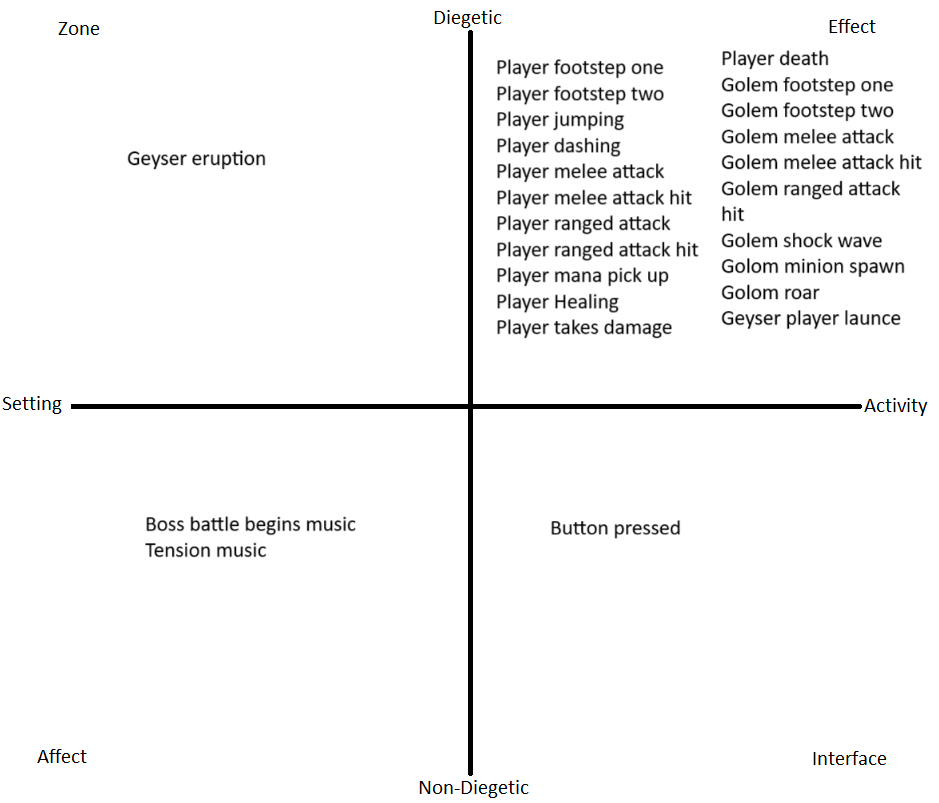 filled in IEZA framework to see where my sounds fit
Missing techniques
I will focus on improving the effect sounds from my game scene. But before improving my scene, I need to know what techniques are missing. There are a couple of things wrong with the sound design in the current scene. The most obvious one is that all the sound sources are static on the same spot and don’t move. In extension of this, the player character has one sound source, and the boss character has one sound source. This results in sounds not being able to play because a previous sound was not finished playing yet. In the GDC talk, ‘Dark Pictures: Season 1’: 4 games in 4 years, they have 8 different sound sources on one character [3].
According to the TestDavLab [4], key principles to pay attention to when testing your sound design include: Randomization, Spatialization, Attenuation and Occlusion.
Randomization
To prevent repetitiveness, game engines can adjust pitch, volume, and delay of sound effects, making each trigger sound slightly different.
In my Unity scene, there is no randomization done with the audio clips I have, no shift in pitch or volume. Every time the sound is played, it is the same.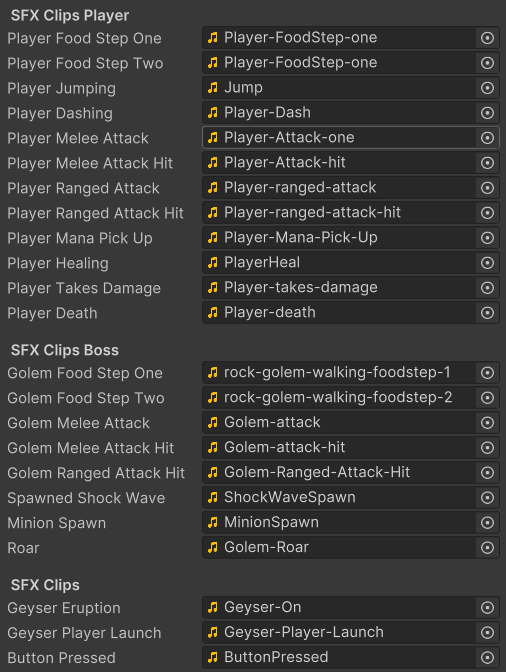
Spatialization
Spatialization places a sound within the game’s 3D space. Unity supports spatialization through the use of audio spatializer plugins, which modify how audio is transmitted from an Audio Source to the listener based on spatial parameters [5]. I however, have not added any of these plugins to my Unity scene. 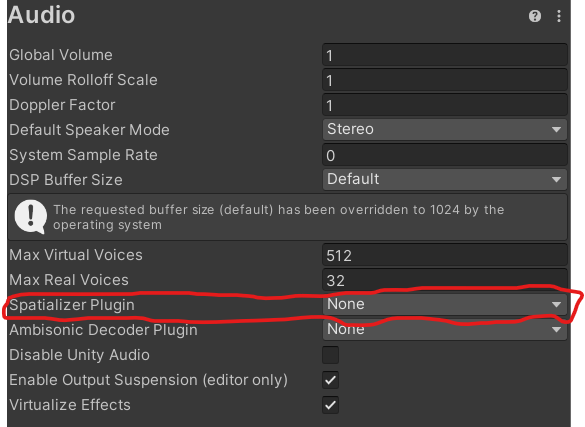
Attenuation
Attenuation manages how a sounds volume decreases over distance In Unity, attenuation can be controlled using the Audio Source component’s settings [6]. I have not changed any of the settings that control the attenuation. 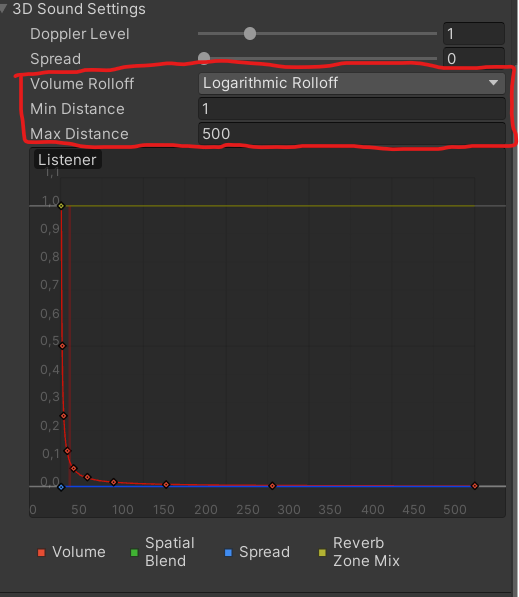
Occlusion:
This refers to how objects between the audio source and listener affect sound transmission, such as muffling when a sound is obstructed. This aspect is not applicable for my scene because the scene is an open arena with no obstacles between the sound sources and the player.
Ideal sound
To give an idea of the ideal sound, I found examples of other midieval fantasy games where the sound is excellent. The example of THE FIRST BERSERKER KHAZAN is especially good because the fight that takes place at the time stamp is very close to my own game scene, so it is a good example to compare to my scene. For Honor
THE FIRST BERSERKER: KHAZAN
time stamp: 17:50
elder scrolls online time stamp: 3:00:00
Adjustments to the scene
multiple audio sources
The first adjustment I’m going to make is spawning in audio sources instead of having a static audio source in the scene. To do this, I followed a tutorial [7]. In my original sound manager, I used the PlayOneShot function on the audio source that was already present in the scene. 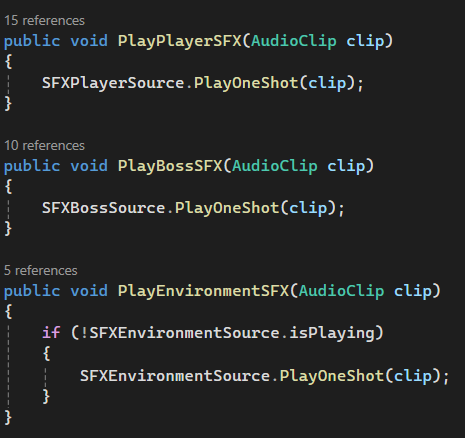 To start, I made prefabs of the existing sound sources in the scene and deleted them from the scene. Changing the sound manager script started with adding a transform variable to the parameters of the PlaySFX function. With that added transform and a reference to the sound source prefabs, we can instantiate a sound source. After that, we add and play the audio clip. Lastly, we take the length of the clip and use that to destroy the sound source after the clip is done playing.
 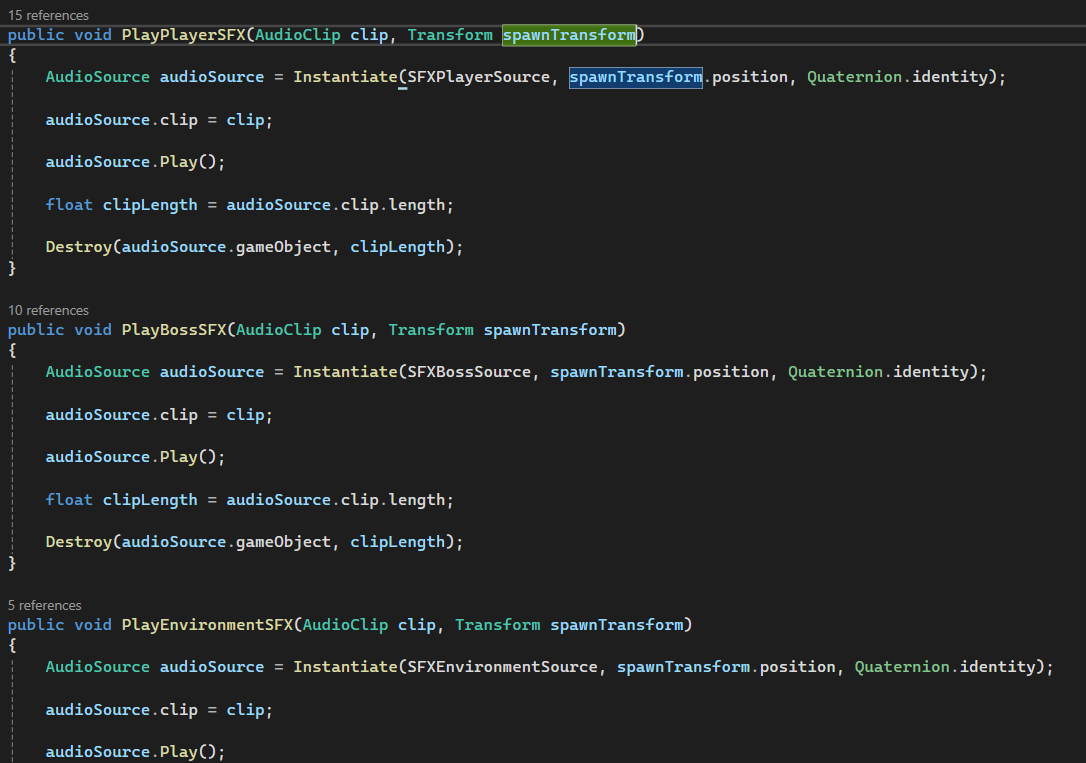 With this change I can make sure all the audio clips will be played at the right time.
Boss fight after spawning in audio sources
Adding spatialization
For spatialization I found a nice plugin for Unity from atmoky [8]. I followed the tutorial on their YouTube to implement it [9]. To add the plugin, I needed to add an audio mixer with different groups first. In the audio mixer, I needed to add the atmoky renderer to the groups that needed spatialization. 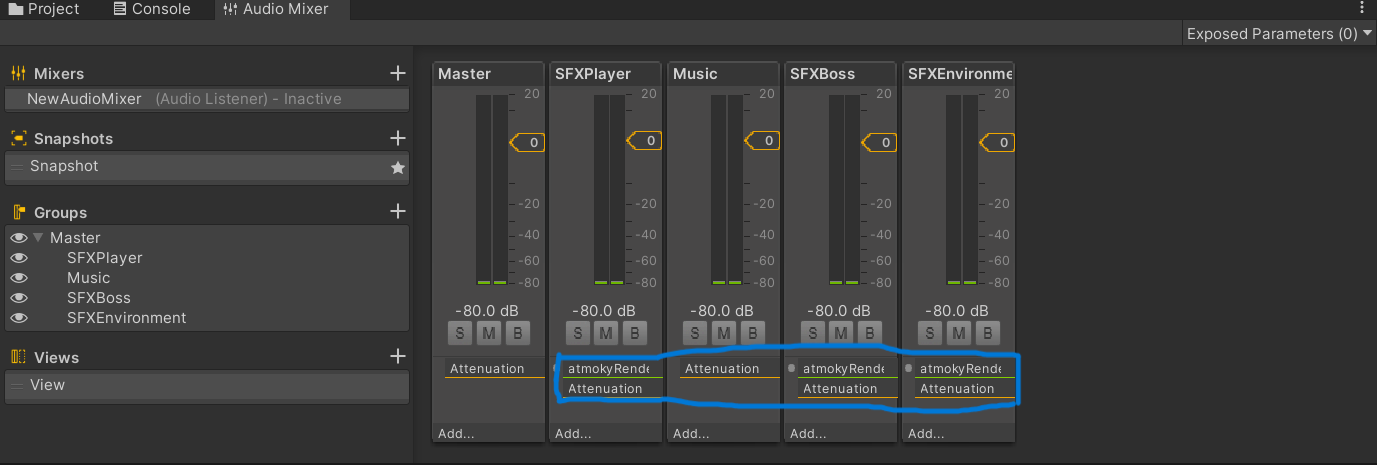 After making the audio mixer, I assigned the output in the inspector of the different audio source prefabs to the correct groups in the audio mixer. I also need to add the Atmoky Source script to the audio source prefab and change the output mode to: Send to renderer/1, 2 or 3.
 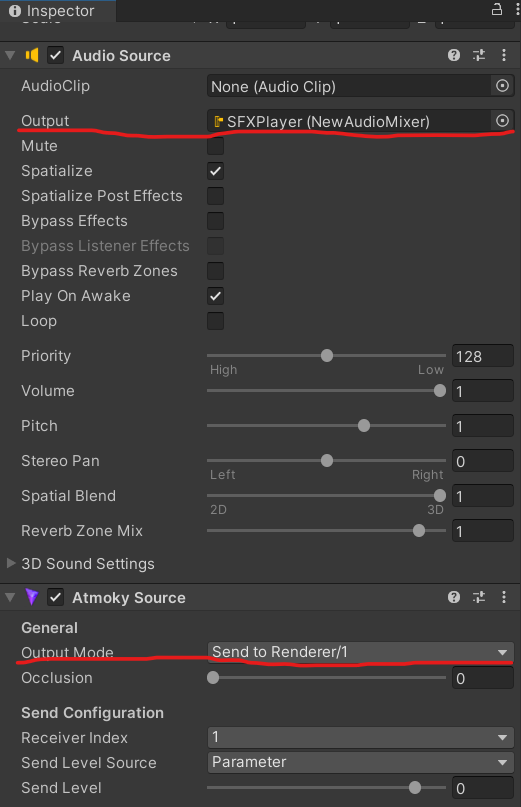 With this change, the audio clips will be put in a 3D space, this will make sure people can hear where the sound is coming from. Adding spatialization is good for diegetic audio, like the effect audio I am focusing on. Non-diegetic audio does not need spatialization on a 3D spatial blend. Boss fight after spatialization
Adding attenuation
As shown before, the beginning settings were a minimum Distance of 1 and a maximum Distance of 500. I changed the values of the min Distance and max Distance to try and make the distance between the player and boss matter, but not make it that the sounds always sound near. After some trial and error, I landed on a minimum Distance of 5 and a maximum Distance of 200. 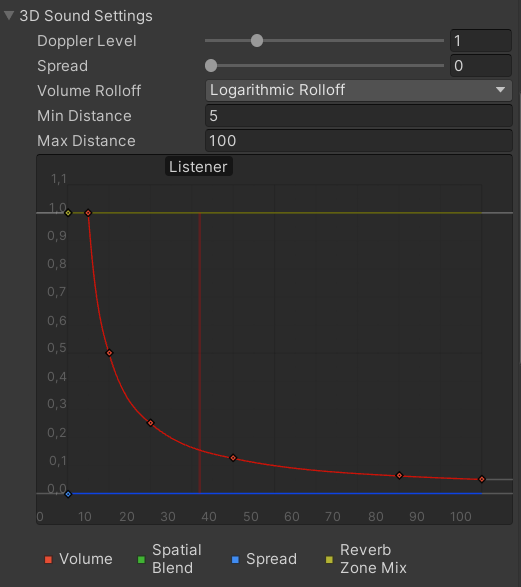 With this change, the distance between the player and the boss matters more for the sound, while still keeping the impact of a 5-meter-tall rock golem walking to the player. Boss fight after attenuation
Adding randomization
To add some randomization to my sounds, I wanted to play a bit with the pitch and volume of the sound. I found a nice tutorial explaining how to randomize the pitch of an audio clip [10]. 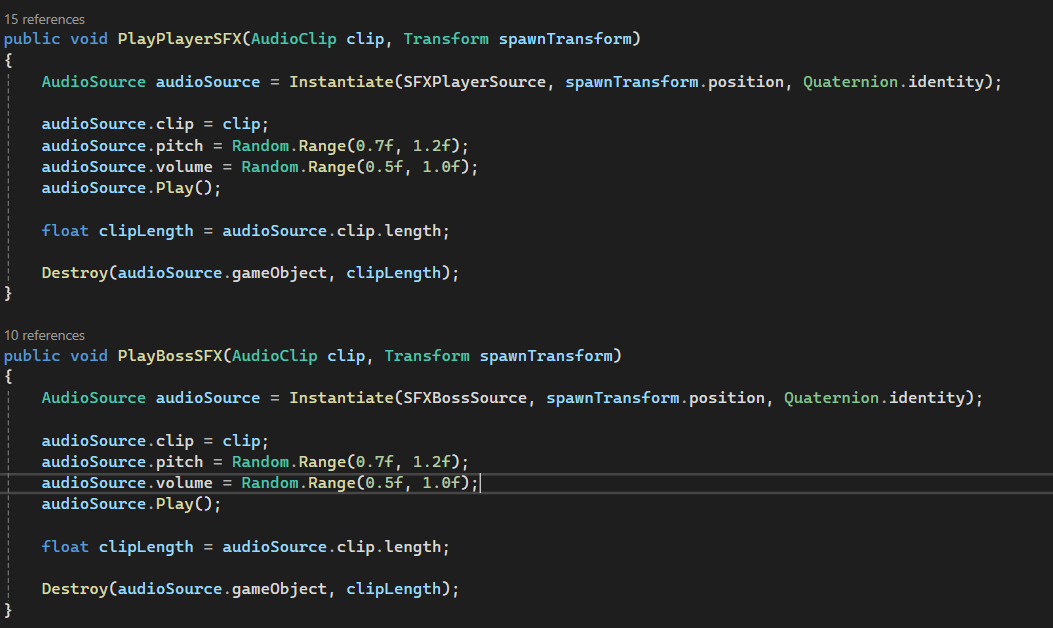 With this change, the audio clips will not sound the same all the time, even though I do not have a lot of varieties of clips for a single action. Boss fight after randomization
Testing the changes
To test if the changes I made were actually enhancing the game audio, I performed a small test. The setup of the test was very simple: I asked people to listen to clip A of the game scene and listen to clip B of the game scene. In this test, clip A was a clip of the game before I made changes to the sound, and clip B was after I made the changes to the sound. After they had listened to both clips, I asked them to answer the question: What video of the game had better sound? In the end, 11 people answered this question, and out of those 11 people, 10 people answered that clip B had the better sound. 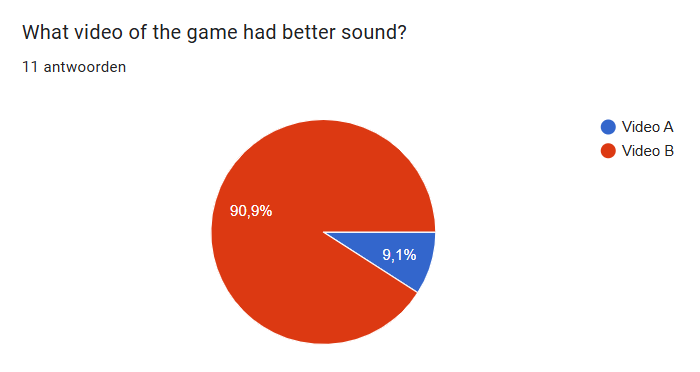
Conclusion
Through this R&D project, I explored how simple sound design techniques can enhance the audio experience of a medieval fantasy boss fight. By analyzing my existing Unity scene using the IEZA framework, I identified the core audio types present and the techniques that were missing—particularly randomization, spatialization, attenuation, and better use of multiple audio sources.
Adding randomization, spatialization, and attenuation in a simple and somewhat crude way, it changes the audio for the better. Just tweaking a few settings and adding multiple audio sources already had a good impact. However, since these changes were added as an afterthought and not fully planned from the start, the final result still felt a bit rough around the edges and not close to the ideal sound. If I had applied proper sound design techniques from the start, the audio would probably be way more polished and natural. This showed me a game developer doesn’t always need fancy tools for good sound design, but starting with the right methods can definitely raise the overall baseline quality of a game’s audio.
Sources
[1] L. Haehn, S. J. Schlittmeier, and C. Böffel, “Exploring the impact of ambient and character sounds on player experience in video games,” Applied Sciences, vol. 14, no. 2, Art. no. 583, Jan. 2024. [Online]. Available: https://doi.org/10.3390/app14020583. [Accessed: Mar. 19, 2025].
[2] S. Huiberts, “IEZA: A Framework For Game Audio,” Game Developer, Jan. 23, 2008. [Online]. Available: https://www.gamedeveloper.com/audio/ieza-a-framework-for-game-audio. [Accessed: Mar. 28, 2025].
[3] GDC. “‘Dark Pictures: Season 1’: 4 games in 4 years,” YouTube, [Online Video]. Available: https://www.youtube.com/watch?v=hr-D-wtK0Ew. [Accessed: Mar. 28, 2025].
[4] TestDevLab, “Base principles of game audio testing,” TestDevLab Blog, Jan. 2023. [Online]. Available: https://www.testdevlab.com/blog/base-principles-of-game-audio-testing. [Accessed: Mar. 19, 2025].
[5] Unity Technologies, “Audio spatializers in XR,” Unity Manual, Version 2022.3, Mar. 10, 2025. [Online]. Available: https://docs.unity3d.com/2022.3/Documentation/Manual/VRAudioSpatializer.html. [Accessed: Mar. 19, 2025].
[6] Game Developers Conference, “4 games in 4 years: Audio Systems for Narrative Horror,” YouTube, Aug. 24, 2021. [Online]. Available: https://www.youtube.com/watch?v=hr-D-wtK0Ew. [Accessed: Mar. 19, 2025].
[7] Brackeys. “How To Add Sound Effects the RIGHT Way | Unity Tutorial,” YouTube, Aug. 12, 2019. [Online Video]. Available: https://www.youtube.com/watch?v=DU7cgVsU2rM. [Accessed: Mar. 31, 2025].
[8] “Overview,” atmoky trueSpatial Unity Documentation, Mar. 6, 2025. [Online]. Available: https://developer.atmoky.com/true-spatial-unity/docs. [Accessed: Apr. 1, 2025].
[9] atmoky. “Spatial Audio for Unity (Part 1) - How To Get Started - atmoky trueSpatial Plugins,” YouTube, [Online Video]. Available: https://www.youtube.com/watch?v=LS_2tgYCDUo. [Accessed: Apr. 1, 2025].
[10] Game Dev Beginner. “Unity Audio Manager: How to Manage Sound Effects and Background Music,” YouTube, Jan. 15, 2023. [Online Video]. Available: https://www.youtube.com/watch?v=CoCHlvGPr90. [Accessed: Apr. 1, 2025].