
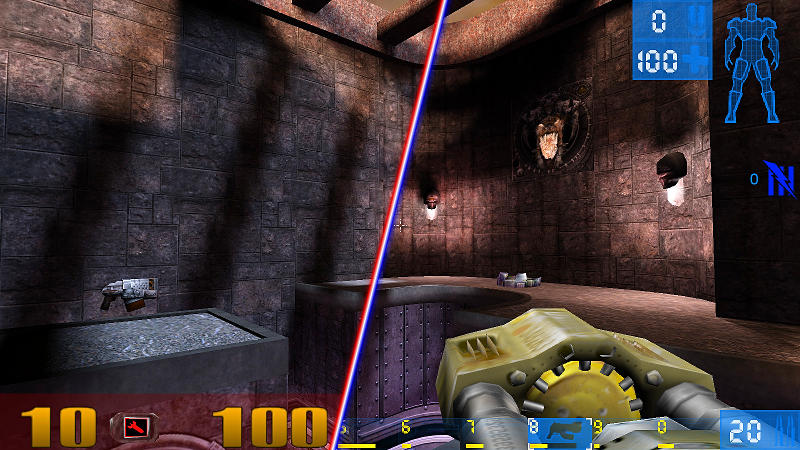
Infinite replayability within a blast from the past
Index
- Infinite replayability within a blast from the past
Abstract
In this document I describe the process, theory and different parts that I used in order to create a procedurally generated multiplayer Boomer Shooter arena style map using Binary Space Partitioning in Unity. Topics like room generation, corridor generation, ramp placement, central room generation, optimalisation and points of interest are all used in this project and will be explained in their own segments down below.
Introduction
Player retention is a fickle thing; while multiplayer games have the potential to stay strong for years after release, some struggle to keep good player counts after release due to players quickly growing bored/being generally uninterested in the game. Repetition in the maps players repeatedly play on can be one of these issues. Players are supposed to constantly have high stakes battles in these carefully crafted arenas for hours at a time. It’s only natural that players can eventually grow bored of these maps.
With this research paper I aim to use Procedural Content Generation in order to generate multiplayer arena maps on seed basis to make maps like in Quake and Unreal Tournament. Since these maps can be generated by players whenever a match is started, the players will always have a new experience every time a match is started. If players want to keep a map, they can simply use the seed again to get the same result. Seed-based generation also allows these maps to be transferred to other player’s games by only sharing a seed, which is way cheaper than uploading and downloading the entire map.
Problem solving & research question
For this project Ive described my problem that I aimed to solve as well as the research question I aim to answer with my research down below:
Problem to solve
Boomer Shooter games have been around for a very long time, but because of their longevity the games usually don’t get the attention or new content that the game needs to truly stay alive. It needs new things in order to stay fresh. I aim to solve that problem by implementing procedural content generation in order to create brand new arenas for players to fight in every match.
However this poses it’s own challenges, as it is difficult for maps to stay fun competitively while also being completely randomly generated. Dancing a fine line between adhering to competitive map design and letting the arena be completely procedurally generated will be a must for this project. In order to achieve this, I will detail not only the techniques I have used and how I implemented them, but also how I payed attention to competitive map design and what requirements my arenas need to have in order to succeed as a multiplayer arena map.
Research question
What is needed in order to create a seed-based arena shooter map using procedural content generation?
Binary Space Partitioning
In order to figure out how to create these multiplayer maps, I first looked towards the games I am trying to emulate. Mainly I am referring to games like DOOM, Wolfenstein, Quake, Marathon and Unreal Tournament. These games layed the groundwork for what would ultimately become truly 3d experiences in games. If I wanted to emulate what they succesfully used back then, I would have to use similar techniques.
In order to achieve a 3D effect, these games used Binary Space Partitioning.

It is a process in which a set amount space is divided into binary squares in order to make it easier to render the maps onto the weak computers at the time. In the case of DOOM, one of the first instances of BSP, they used this method along with their own map editor like this:
| Sector View | Subsector View |
|---|---|
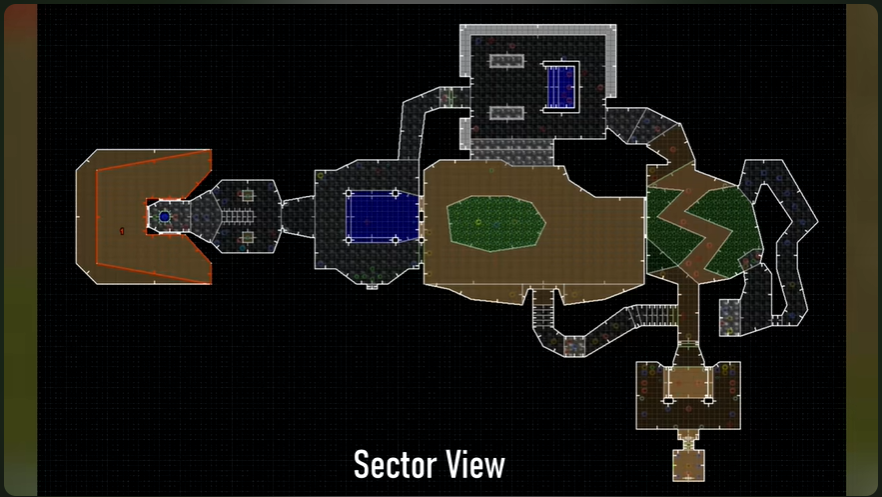 | 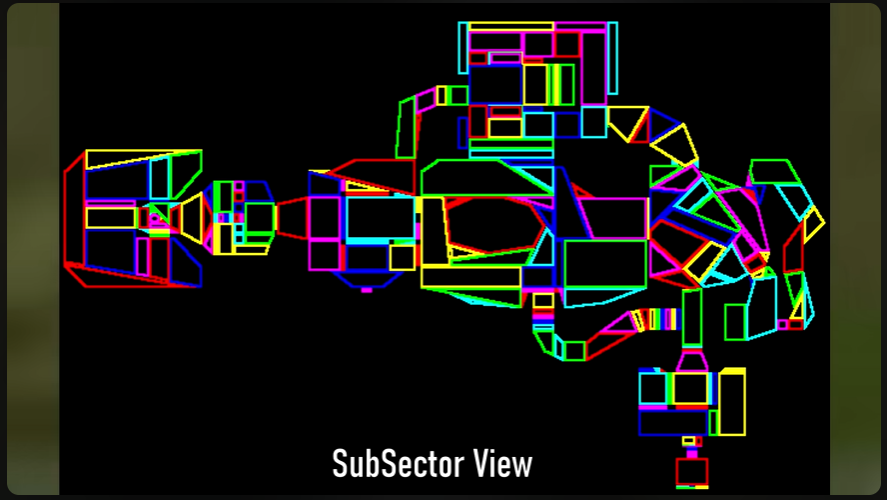 |
Source: [1]
The map is divided into bite-sized bits that are very easy for computers to render while still keeping its uniqueness and verticality. This inspired me to use BSP in a similar way, albeit slightly different.
BSP in project
For our BSP school assignment I used a very good tutorial from Sunny Valley Studios[2] in order to get an idea on how to use BSP in order to procedurally generate a 2D dungeon. Instead of ID Software’s implementation of the technique, it is used differently in this project.
The algorithm is given a certain amount of space within the game that it can use in order to procedurally generate. Then it takes that space and randomly divides it into random shapes, like this:
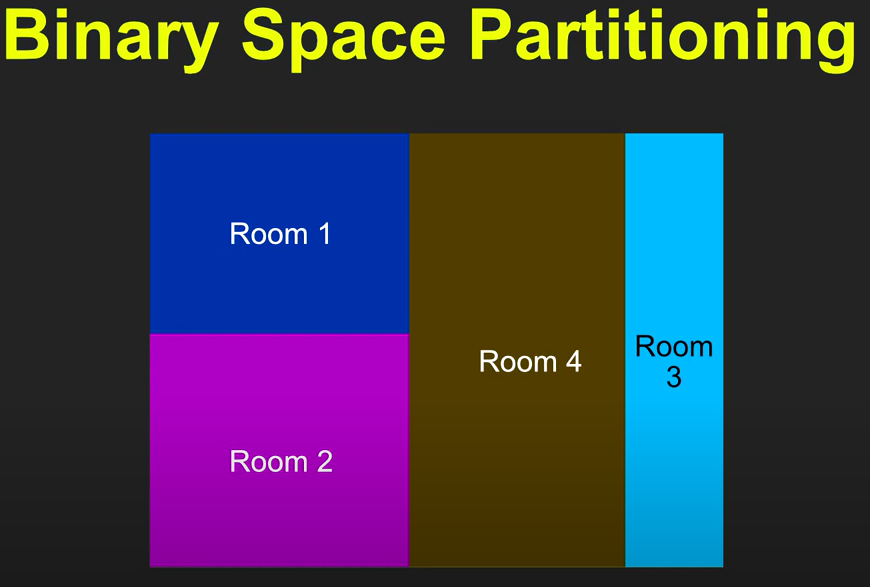
Rooms are constantly cut up, for as long as they are big enough to be divided as decided by given parameters (Set values for minimum room width and minimum room height). Rooms that end up not being more dividable as well as smaller then the given parameters become false and will not be rendered. Meanwhile rooms that can’t be divided any further but are still within room parameters are saved and indicated as usable rooms.
These rooms are then divided into 1x1 blocks and their coordinates are saved in order to be able to draw the procedurally generated map in game. Using these coordinates you can make an endresult like this:
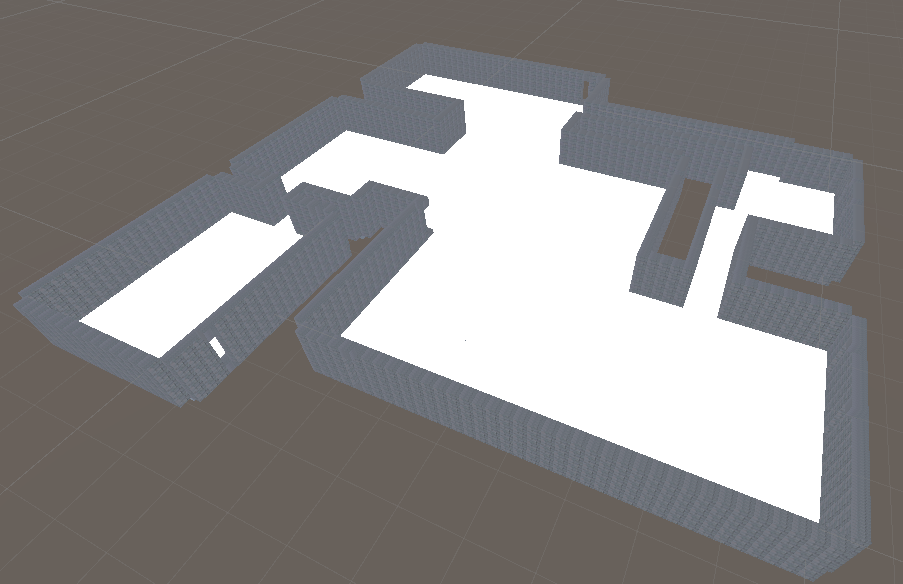
This gives us usable rooms for players to fight in. Using random chance we can further individualize these rooms by giving them windows, holes or stairs to other levels. These rooms will also house the different interactable objects for the player to pickup, like weapons, health and powerups.
Ramp Generation
The different levels allow for a bigger number of players to explore and fight in the arena in more ways possible then it would be on only a single level. In arenas of other Boomer Shooters, like DOOM, Quake and Unreal Tournament, the numerous levels in their arenas also add for more interesting gameplay.
However multiple stories in your arena means that you need options to explore said stories. For this I have created an algorithm for generating ramps in my arena. It works as follows:
The arena is generated per level:
- Level 1
- Level 2
- Level 3
Each of these levels have their own rooms and center orientation (more on that in this segment). During the generation of each level, their floorplan is stored as a HashSet< Vector2Int > on which the floor is represented in 1x1 2D tiles per Vector2Int. If a level has one below it (meaning Level 2 and above), the algorithm takes the current floorplan and the floorplan of the previous level and compares the centers of each room on the current level to see where it would be possible to place a ramp.
See the image below:
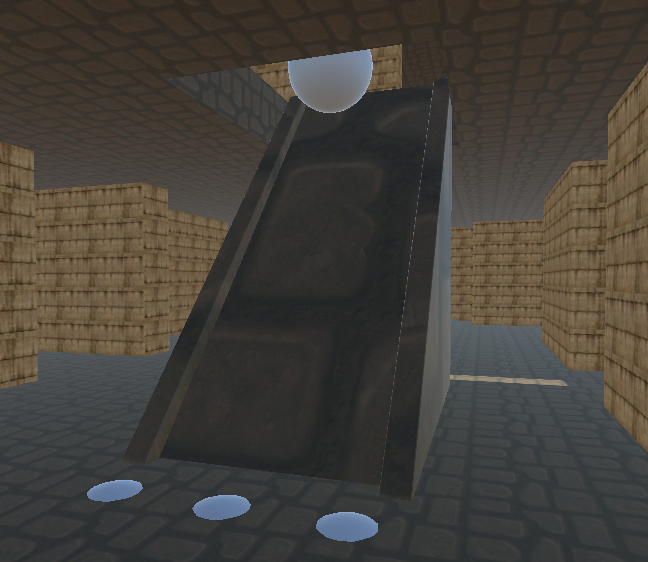
In this image you can see the ramp generated, along with the 4 points that it uses to measure whether it fits in the current position illustrated by the white indicator spheres. The indicator on the top floor is the center of the room above, indicating where the algorithm decided to put the ramp to the floor above. From this point the algorithm checks in all cardinal directions.
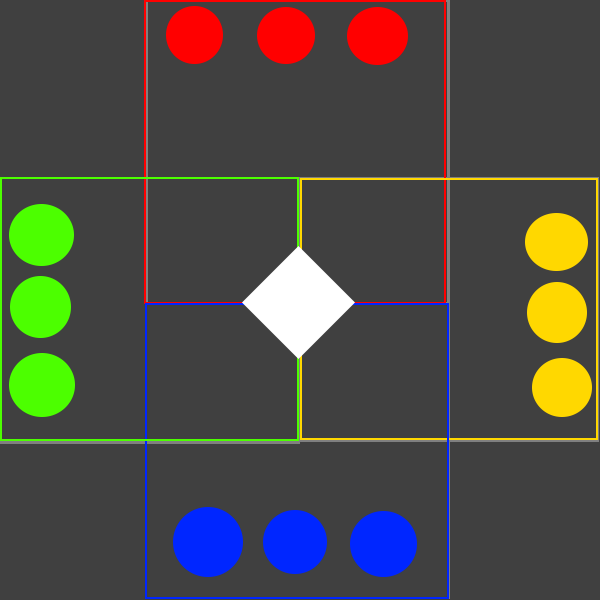
The white diamond in the image above is the center of the room from the floor above. From that center part, it looks towards each of the little circles on this image as possible end coordinates for the ramp. In this image, the colors refer to:
- Red is North / Up
- Yellow is East / Right
- Blue is South / Down
- Green is West / Left
The algorithm checks red first, following up with yellow -> blue -> green until it finds a possible position for the stairs to be placed. If no possible position can be found, due to a wall or hole in the way, it will check the next room center to see if the ramp fits there.
Using this system I can get proper positions for the ramps to spawn in. However, since I check several cardinals to see how the ramp fits in a room, the rotation of the ramp and the hole needed for the player to actually walk onto the next floor need to be dependant on whichever cardinal fits.
In order to achieve this, I check the end position of the indicators and the center it originated from and use those coordinates to make a Vector2. This Vector2 is then normalized, allowing me to get 1 of 4 possible results:
- Up (0,1)
- Left (1,0)
- Down (0,-1)
- Right (-1,0)
Now that the cardinal is translated to usable code, I can use these normalized vectors to orientate the ramp and the assosiated hole to get the desired final result.
Points of Interest
Boomer Shooter games have several items that players can interact with in order to gain an edge over other players. Think of items like:
- Weapons
- Health packs
- Armor packs
- Powerups
But also objects players can’t pick up, like:
- Teleporters
- Jumppads
- Moving platforms
- Holes
These interactables are what I call points of interest. These are points in the map that players will actively remember for the items that are in them. These points aren’t just to empower players, but also to incentivize players to fight over them.
To add these objects, I first divided the interactables based on how important they are.
Weapons, for instance, can change the flow of a battle completely, allowing a player to dominate if they are proficient with that weapon. This makes weapons very important. Items like health and armor, while still crucial to every player, are less important and can thus be spawned way more then weapons. I divided the interactables as such:
- Weapons [Important]
- Powerups [Important]
- Health packs [Not Important]
- Armor packs [Not Important]
- Teleporters [Not Important]
- Jumppads [Not Important]
Of each of the [Important] interactables, they need special positions or will only spawn on one place in the map. Meanwhile, [Not Important] interactables can appear more frequently and can be in several spots.
In order to dictate what spots on the map can and can’t become points of interest, I decided to look at the corners of rooms.; It is impossible for an object to be in the way of the players’ general path if they spawn in a corner or in the center of the room. Seeing as I already use the center of the room for the ramps and holes, I opted to place these points in the corners.
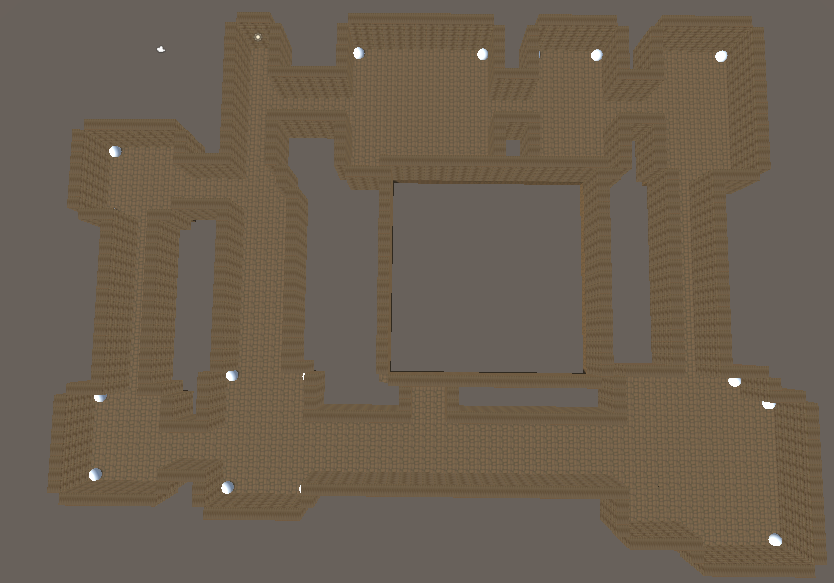
In the image above is a floor of the current iteration of the arena generation. Each white ball on the floor serves as an indicator to show where the algorithm has found possible points of interest. Most of these will serve to spawn health packs or armor, but by chance some of these can become weapons, to a maximum of two per floor.
In the center rooms there will be a specially dedicated spot for points of interest as well. This can be a powerful weapon, a strong powerup or an interactable with functionality like a teleporter, jumppad or ramp.
What makes a map competitive?
The maps that are generated by what is developed in this project are intended to be used in a game genre called Boomer Shooters. Think of games like DOOM, Quake and Unreal Tournament. These are competitive games at heart, the main appeal they have is that it allows players to express their skills in fighting one another. The maps themselves play a massive role in this, as if a map is not that good competitively speaking, it is not appealing at all.
That begs the question: What makes a map competitively viable?
In this segment I will detail several aspects that I find to be important in order to make a map competitively viable, based on research documents and observations in competitive maps like those from DOOM, Quake and Unreal Tournament.
Room Design
Competitive shooter games require a quick reaction time from players. Pro gamers from competitive teams like FNATIC boast reaction speeds ranging between 200ms to 170ms reliably[5]. This means that maps cannot be too distracting or cluttered with several random objects around the map. Competitive team Dignitas wrote this article[3] on competitive maps in CS:GO,emphasising the importance of simplicity and visibility.
In order to satisfy this category, generated maps need to contain the following:
- Rooms cannot be cluttered, preventing players from moving around and allowing players to spot incoming danger that might be present.
- The room’s design/colors cannot distract the player to the point of bad visibility.
Map Flow
Speed is as important of an aspect of Boomer Shooters as the shooting itself is. The fast momentum that players use to blitz around the map is a massive part of player enjoyment. This means, however, that Boomer Shooter maps need to accomodate said movement. Thats what this category is for.
In order to satsify this category, generated maps need to contain the following:
- Rooms need to be connected to multiple rooms, not just one.
- Rooms cannot be too narrow; players need to be able to move around in said rooms.
Weapon / Item placement
In Boomer Shooter games, the players spawn in with a basic pistol with very limited ammo. In order to obtain new weapons, weapon spawners are located all over the map, tempting players to explore and fight around these weapons in order to obtain favorable weapons depending on preference and map design.
In short these maps have Points of Interest dotted all over the maps. These POI can be weapons, but also health pickups, armor or even powerups with exotic effects. In order to satisfy this category, generated maps need to contain the following:
- Weapons, health and other pickups need to be present on every floor.
- Pickups need to be properly spaced apart, not to make a singular hotspot where all the relevant items are located.
- The stronger weapons and effects need to be farther away from the center of the map, making players actively take decisions in order to get strong items.
Open Areas
Competitive maps usually have a center point; a core, open part of the map where most of the fighting takes place. This core spot allows players to more quickly find one another, letting fights happen more quickly and in turn makes the game more engaging. For instance, in this source[4] a level designer used Unreal Engine in order to create his own Unreal Tournament map. A heatmap that was used to test the created map shows that a lot of conflicts happened around the center part of the map, further strengthening the need for a central, open area.
In order to satisfy this category, generated maps need to contain the following:
- Maps need to contain a bigger, central room that is connected to several other rooms.
- The central room needs to be connected to multiple floors, promoting entry from several entrances.
- The core room needs to contain incentives for players to fight over, like flags, powerups or weapons.
Verticality
Verticality is a very important aspect in competitive games, as it not only makes maps more engaging to play on but also gives players advantages over players that are below them. Adding verticality gives players choices in an extra dimension, allowing for all kinds of interactions with one another.
In order to satisfy this category, generated maps need to contain the following:
- Maps need at least two floors.
- Floors need to be connected by at least one ramp between.
- Floors need to have holes in them, in order to further connect two floors and make manouvering around the map more interesting.
Center Area Generation
After doing some research needed for making the requirements the final product needs to adhere to, I quickly figured out my arena needed some sort of middle/center room feature for proper map flow. Based on sources [3],[4] and [5], a center room promotes fighting by having a centeralized spot for players to find one another. Since the current arena is a series of rooms and hallways, this sounded like exactly what I needed.
However, how would I go about making this center room while still keeping it fresh/interesting to interact with?
In order to fulfill the role of a proper center room, while also keeping the randomized nature of the generated ideas I decided on the following: The center room is a room that will be generated based on patterns, varying per floor. What I mean by this is that each floor gets a unique layout per pattern. A pattern is then assigned per floor during generation, and the specific layout from that specific pattern is then fetched and added to the floorplan.
Below are some illustrations on how I want to build the patterns for the center:
| Pattern 1 | Pattern 2 | Pattern 3 |
|---|---|---|
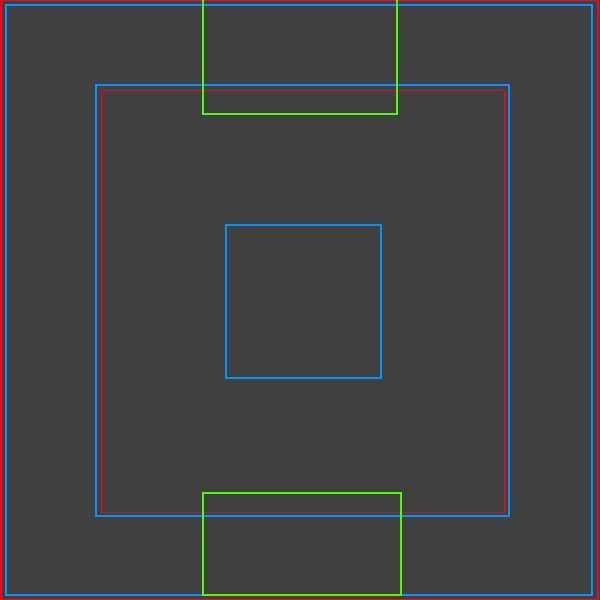 | 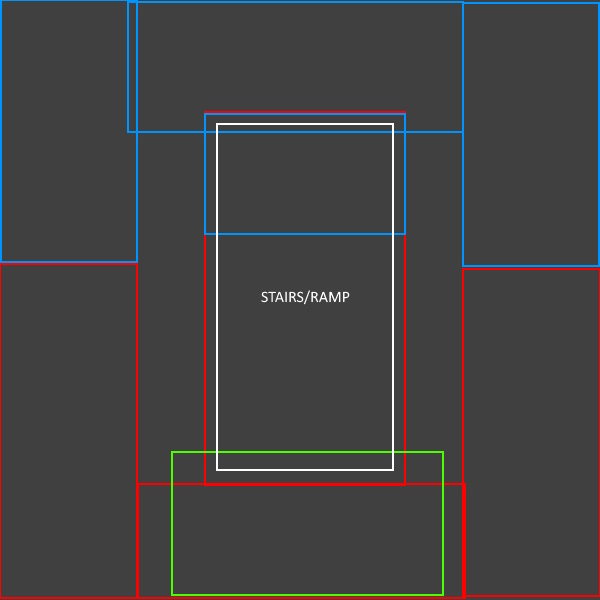 | 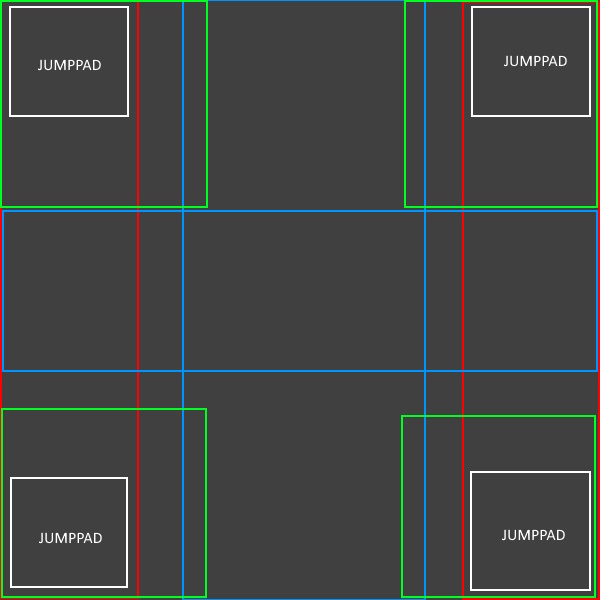 |
These images are a top-down view of how I want to lay out the floor plan for the middle room per pattern. In these images, each color represents the following:
- Red: Floor 1
- Blue Floor 2
- Green: Floor 3
Now that I have specific floorplans per pattern per floor, I let the algorithm randomly choose what pattern to execute per floor. This gives 48 different possibile layout for the total center room to have. Sharp readers might note that 3 * 3 * 3 != 48. You would be correct, however I also made it possible for floor 1 and floor 3 to spawn without a center room layout, adding a fourth possibility on these floors.
Finally, to make these rooms work as intended, I gave each pattern per floor an intended point of entry. This is a fixed spot from which a player can enter the center room on this floor. The algorithm takes this point and looks at the nearest room. Then a corridor is made between these two points, allowing for players to enter. For more information, see this segment.
Improved Corridor Generation
In order to adhere to the requirements I made for my own project, I needed to redo some of the corridor generation for the arena. The previous iteration often did not succeed in generating multiple corridors per room, so this needed some changing. In the sections below I describe how each iteration worked and what I changed in order to get a desired result.
Previous Iteration
The corridor generation is the final step of the floor plan generation, of which I use said floorplan to create holes, ramps and more. So for context, I will also describe how rooms are generated in this iteration as it helps contextualize how the corridors are used to connect them.
I use Binary Space Partitioning (more on that here) in order to take the total arena space and divide it into smaller, usable rooms to fight in. Then I take the center of the playing field and forcefully draw a center room in there, overwriting the space that another room might have occupied before. When both of these steps are done, the corridor generation starts and looks at all room centers to dictate which one is closest. It does this process twice, in order to qualify for the two-corridor-per-room requirement.
However, there is a flaw in this process. Since I forcefully generate a middle room, as well as draw two corridors per room, each room will always make a corridor to the center as it is almost always closest.
It lead to more jarring maps, with a barely fenced off center that was too easy to access from all sides. This was not the result I intended to get, so I needed to change the process up in order to get a more desired result.
Current Iteration
First I isolated what caused this problem; the center room. Because this room is added before corridor generation, it hinders the corridors from connecting with other regular rooms. Adding the center after corridor generation also was not the result I was looking for, as it would both overwrite the corridors that happened to overlap with it as well as not getting any corridors of its own.
So I made a different plan with two steps:
- Change room generation to work around the center and make corridors ignore the center
- Allow the center to generate its own corridors, depending on the patterns generated.
The second point is heavily dependant on the context from the center area generation segment found here.
First off, the room generation changes. In order to prevent the center from obstructing rooms, I needed to find a way to generate rooms while keeping the center room in mind. The solution I opted for was as follows:
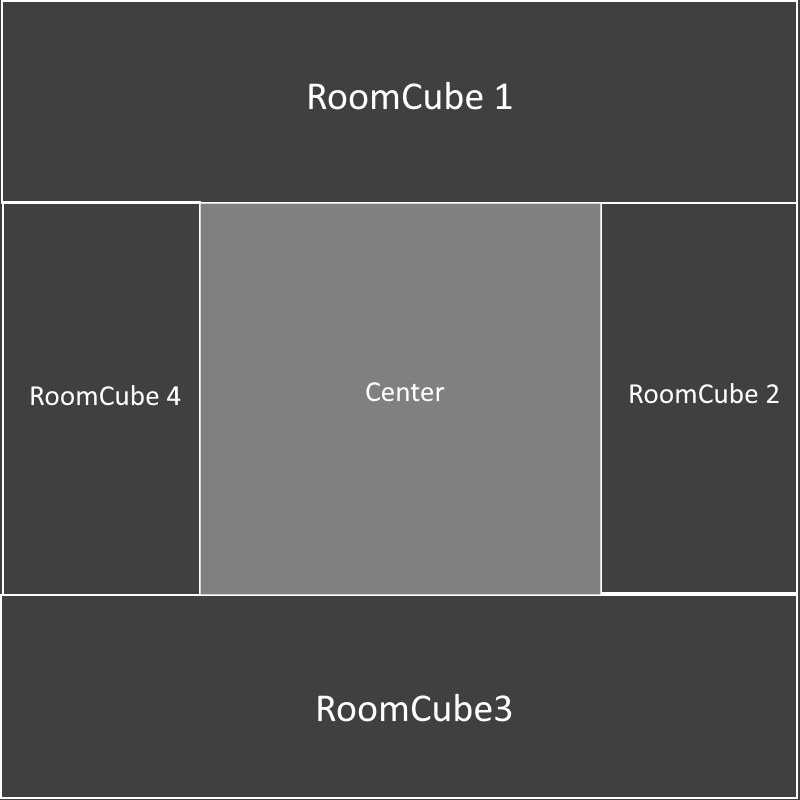
To avoid the center from becoming a problem, I decided to generate the rooms in a circle around the center, in order to avoid any overwriting. Binary Space Partitioning is a process in which a given area. I decided to, instead of the one big area for the entire map, to make four smaller areas (referred to as RoomCubes above) and divide those. This way no room could be generated in the center. This way of generating rooms also made it safe to do corridor generation before filling the center, as the rooms are now in a circle around the middle. They simply dont need to go through the middle anymore.
For the second point, I integrated that with developing the center area. For each of the patterns that can be used for the center, I also have anywhere between 1 and 3 coordinates from which the center can generate corridors to the closest rooms. This means that whenever the center is generated, the algorithm takes these coordinates and compares them against all the room centers in order to find the closest room. Then it finally generates the new corridor and combines it with the floor plan in order to get the current iteration.
Optimalisation
Using Binary Space Partitioning, each floor is generated as a HashSet< Vector2Int > consisting of coordinates for 1x1 tiles, which are translated while rendering into 1x1x1 cubes. While it was servicable when I was working on the project and tinkering away at different features, it lead to tens of thousands of cubes being generated every time an arena was made.
The following images are the stats of how the game ran in runtime as well as the amount of cubes generated in this pre-optimalisation arena.
Note that the results were taken on my Lenovo IdeaPad L340 Gaming laptop.
| Runtime stats | Cubelist count |
|---|---|
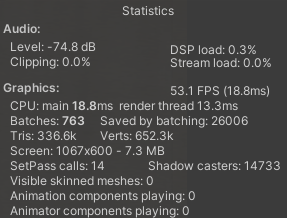 | 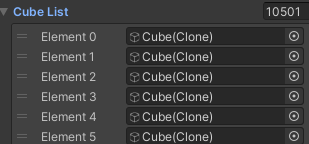 |
As depicted above, the performance of the arena pre optimalisation was far from ideal. And while the project itself was not intended to have an actually playable product, optimalisation is one of the most important key features for map design. Therefore I decided to work on optimizing the arena, despite the fact I originally intended it to be a task to work on if I had more time for this project.
Initially I wanted to forego spawning cubes using the Vector2Int coordinates from the floor HashSet< Vector2Int > and use them as vertices instead. This is in my eyes the most optimal solution to optimizing this project, as it lowers the objects to render from tens of thousands to merely a handful of meshes for the floors and walls.
However due to my limited time and lack of experience with meshes, I decided for a different approach.
Seeing the arena as a whole, it was clear to me that having so many little cubes next to one another was a waste, considering that the same surface area could be achieved more optimally using bigger cubes. So I created a new function for initializing the floor, one that looks at coordinates next to the current coordinate to see what size of cube would fit.
private FloorTiles CheckPossibleFloorTiles(int currentIteration, Vector2Int currentTile, HashSet<Vector2Int> floor, HashSet<Vector2Int> checkedFloorTiles)
{
    FloorTiles currentFloorTile = FloorTiles.baseTile;
    bool floorNotFound = false;
    int newIteration = currentIteration;
    HashSet<Vector2Int> floorTilesCurrentIteration = new HashSet<Vector2Int>();
    HashSet<Vector2Int> floorTilesAllIterations = new HashSet<Vector2Int>();
    Vector2Int posToCheck;
    int iterationToCheck;
    FloorTiles checkChosenFloorTile;
    while (!floorNotFound)
    {
        newIteration += 2;

        for (var col = 0; col < newIteration; col++)
        {
            for (var row = 0; row < newIteration; row++)
            {
                Vector2Int newPos = currentTile + new Vector2Int(col, row);
                posToCheck = newPos;
                if (floor.Contains(newPos) && !(checkedFloorTiles.Contains(newPos)))
                {
                    floorTilesCurrentIteration.Add(newPos);
                }
                else
                {
                    currentFloorTile = TranslateIterations(currentIteration);
                    iterationToCheck = currentIteration;
                    checkChosenFloorTile = currentFloorTile;
                    floorTilesCurrentIteration.Clear();
                    floorNotFound = true;
                    goto FoundEmptySpace;
                }
            }
        }

    FoundEmptySpace: Debug.Log("Quit the for loops");

        floorTilesAllIterations.UnionWith(floorTilesCurrentIteration);
        currentIteration = newIteration;

        if (newIteration >= 7 && !floorNotFound)
        {
            Debug.Log($"Maxed out CheckPossibleFloorTiles()! Iterations: {newIteration}");
            currentFloorTile = FloorTiles.massiveTile;
            floorNotFound = true;
        }
    }


    checkedFloorTiles.UnionWith(floorTilesAllIterations);
    return currentFloorTile;
}
The code snippet above is how the algorithm checks which tiles to combine into one. In the while loop, it constantly iterates in jumps of two to check how big it can make the tile. The translation of iterations to tile is as follows:
- Failed iteration 3 -> Instantiate 1x1 tile
- Failed iteration 5 -> Instantiate 3x3 tile
- Failed iteration 7 -> Instantiate 5x5 tile
- Succeeded iteration 7 -> Instantiate 7x7 tile
In order to prevent tiles from overlapping or grabbing the same tile to check whether it is free or already in use, I use two HashSet< Vector2Int > variables. These are floorTilesCurrentIteration and floorTilesAllIterations.
The floorTilesCurrentIteration is constantly filled with the tiles that have been tested that iteration. If a tile in the current iteration is empty/has a wall in it, the iteration will be considered failed and the floorTilesCurrentIteration will be cleared. This is necessary in order to make sure the tiles checked during this iteration can be used for the grouping for other tiles, considering it did not work for the current tile grouping.
After each iteration is done, all the tiles from floorTilesCurrentIteration are saved in floorTilesAllIterations. This HashSet< Vector2Int > only serves to save all of the successfull tiles. When the algorithm is done looking for what FloorTile needs to spawn, the contents of floorTilesAllIterations is given to checkedFloorTiles. This is yet another HashSet< Vector2Int > that is used in the foreach loop to check if the current tile that is being checked has already been used by another tile.
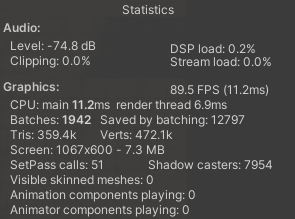
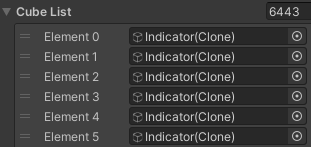
Using this optimalisation, the following are the stats and cube count in a post optimalisation arena.
| Runtime stats | Cubelist count |
|---|---|
 |  |
Testing based on parameters
In this section I will test 5 generated arenas against the requirements made in this section. I will have several tables detailing each category, along with the seed that arena generated.
Test 1
Seed: 402468
| Room Design | Map Flow | Weapon / Item Placement | Open Areas | Verticality |
|---|---|---|---|---|
| Success | Failed | Success | Success | Success |
This arena had a room on the far end that ended up with only one corridor, failing on Map Flow.
Test 2
Seed: 145518
| Room Design | Map Flow | Weapon / Item Placement | Open Areas | Verticality |
|---|---|---|---|---|
| Success | Success | Failed | Success | Success |
This arena had a barrel spawn over the ramp opening. This means players are obstructed when using this ramp.
Test 3
Seed: 209958
| Room Design | Map Flow | Weapon / Item Placement | Open Areas | Verticality |
|---|---|---|---|---|
| Success | Failed | Success | Success | Success |
This arena had a room with only one corridor, as well as a room with multiple corridors but one of the corridors was one block wide.
Test 4
Seed: 86689
| Room Design | Map Flow | Weapon / Item Placement | Open Areas | Verticality |
|---|---|---|---|---|
| Success | Failed | Failed | Success | Success |
This arena had, once again, a room with only one corridor. It also had a barrel spawn over a ramp.
Test 5
Seed: 389785
| Room Design | Map Flow | Weapon / Item Placement | Open Areas | Verticality |
|---|---|---|---|---|
| Success | Failed | Failed | Success | Success |
This arena had, much like the last, a room with only one corridor and had a barrel spawn over a ramp.
Evaluation
On the front of Room Design, Open Areas and Verticality the current algorithm succeeds to satisfy the categories. However on Map Flow and Weapon/Item Placement, there are some issues. Mainly these two:
- Rooms spawn with only one corridor
- Barrels spawn over ramps
For the barrel issue, the problem is that apparently the barrel spawning does not check if there is space for the barrels to be placed. This can easily be fixed and will be implemented before the summit.
On the rooms spawing with a single corridor however, I can only hypothize that these room spawn with singular corridors because both of the generated corridors follow the same path.
This can be solved by making the generation of the second corridor follow a slightly different order. For instance: the first corridor would move on the x-axis first and then move on the y-axis, while the second corridor would move on the y-axis first and then the x-axis.
Sources
- [1] ShreddedNerd “Why Doom is Awesome: Binary Space Partitioning,” YouTube. Link (released 23 jul 2021).
- [2] Sunny Valley Studio, “Unity Procedural Dungeon Generation 2D - Introduction,” YouTube. Link (released 18 dec 2020).
- [3] “Tips for Designing and Creating Competitive Maps,” Dignitas, Mar. 18, 2018. Link.
- [4] “Unreal Tournament Map | Sebastianbinder,” Sebastianbinder, 2019. Link.
- [5] FNATIC, “ESPORTS PLAYERS TEST THEIR REACTION TIMES!,” YouTube, Jun. 26, 2024. Link.