
Procedural Planet Generation
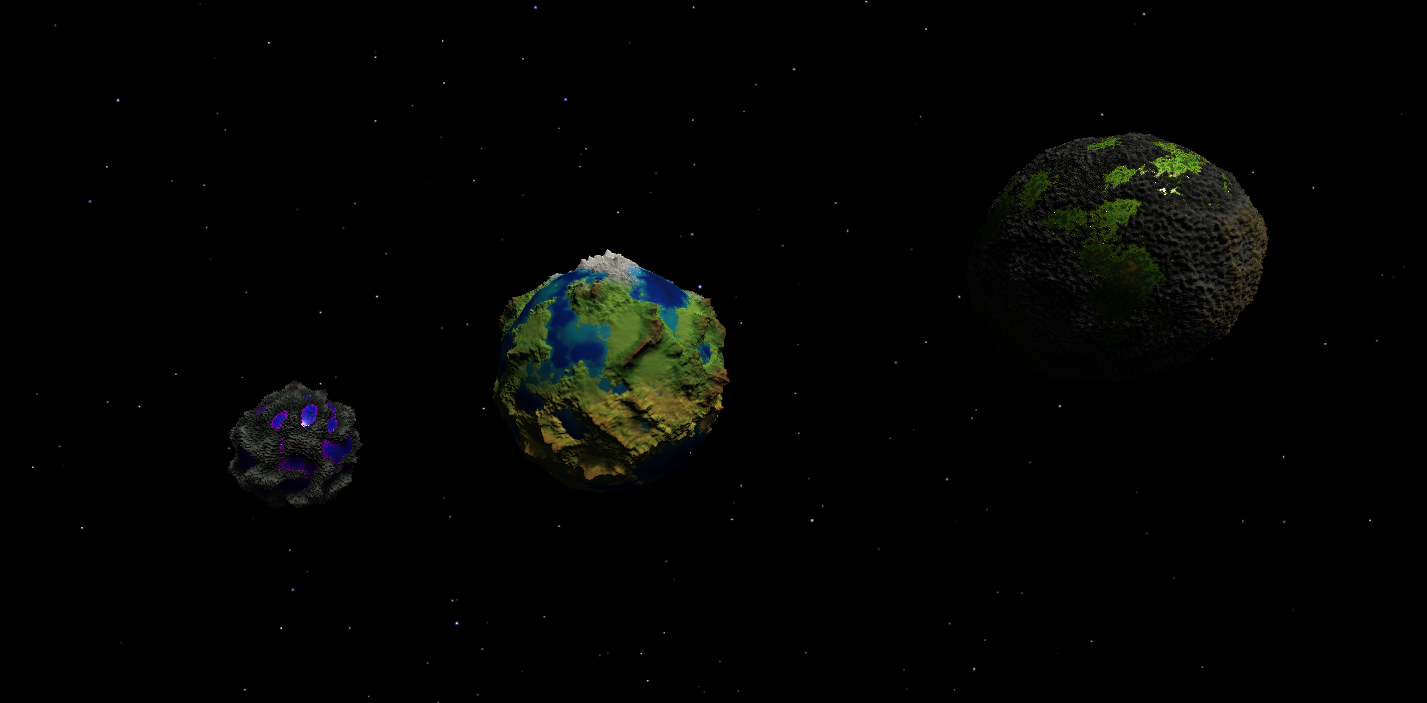
1. Introduction
1.1 Project context and motivation
During an earlier bootcamp in the same year, multiple assignments focused on procedural techniques, including mesh generation and the creation of a procedural dungeon generator. These projects introduced the concept of generating complex structures through rules and parameters. When given the freedom to choose an individual topic for the Research & Development project, that experience naturally influenced the direction of this project.
At the same time, there was a strong personal interest in space and science-fiction environments. Large, visually distinct planets often play an important role in games, films, and interactive storytelling. However, manually creating detailed planets is time-consuming and does not scale well when many unique worlds are required. Procedural planet generation offers a solution to this problem by allowing a single system to generate a large variety of planets through adjustable parameters.
The initial goal of this project was therefore to explore how a single procedural planet could be generated. Over time, this goal evolved into designing a procedural planet generator, capable of producing multiple independent planets, each with its own shape, colors, and overall identity, while still remaining controllable and visually consistent.
1.2 Inspiration and visual direction
The visual and conceptual inspiration for this project comes from several games and media that successfully use planets as expressive and memorable environments.
Games such as No Man’s Sky demonstrate how procedural generation can be used to create vast numbers of planets by combining noise, parameters, and randomization. Outer Wilds shows that even procedurally generated planets can feel handcrafted when their visual language is clear and readable. From World of Warcraft, inspiration was taken from the use of art and strong color separation to improve readability. Finally, Star Wars served as inspiration for strong planetary silhouettes and clear environmental moods.
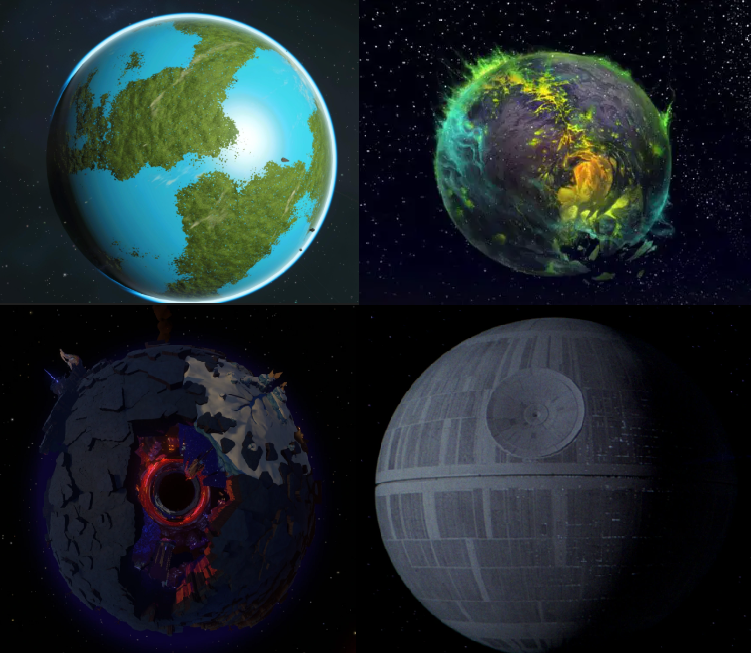
Rather than aiming for photorealism, the visual direction of this project focuses on stylized but believable planets. Key design goals included readable terrain features, visible height differences, and strong contrast between biomes, especially when viewed against a dark space environment.
1.3 Research aim and main question
The aim of this project is to research and implement a procedural system that can generate visually diverse planets while remaining technically stable and artistically controllable.
This leads to the following main research question:
How can a procedural planet generator in Unity be designed to create visually diverse planets using adjustable parameters for shape and color, while ensuring that each planet remains independent and predictable?
To support this main question, the project explores several sub-questions:
How can a sphere mesh be generated in a way that supports uniform terrain deformation?
Which noise techniques produce natural-looking terrain on a spherical surface?
How can height-based coloring and biomes be applied without relying on manual textures?
How can multiple planets be generated without shared data causing unwanted visual changes?
1.4 Constraints and success criteria
Several constraints influenced the design and scope of this project. The available development time was limited, and performance considerations placed practical limits on mesh resolution and runtime generation. Additionally, the system needed to be usable within the Unity editor without constant regeneration causing instability or excessive memory usage.
Based on these constraints, the following success criteria were defined:
The system must be able to generate at least three visually distinct planets from the same codebase.
Each planet must have its own independent shape and color settings, without affecting other planets.
Randomization must be constrained within defined bounds so that planets retain a clear identity.
Terrain features such as mountains and height differences must remain visually readable through lighting and coloring.
The generator should function reliably within the Unity editor environment.
These criteria were used throughout the project to evaluate design decisions and to determine whether the procedural planet generator fulfilled its intended purpose.
2. Background and research
Procedural planet generation combines concepts from procedural content generation, computer graphics, and game development. Before implementing the system, background research was done to understand existing approaches, common techniques, and typical challenges associated with generating planets procedurally.
This chapter provides an overview of the theoretical background that informed the design decisions in this project. It covers procedural content generation in games, different approaches to spherical meshes, noise-based terrain deformation, and height-based coloring techniques. These topics form the foundation upon which the procedural planet generator was built.
2.1 Procedural content generation in games
Procedural Content Generation (PCG) refers to the algorithmic creation of game content using rules, parameters, and randomness rather than manual authoring. PCG is commonly used to generate levels, terrain, items, and environments in games where scalability and variation are important (SmashRiot, n.d.).
One of the main advantages of PCG is scalability. Instead of manually designing each asset, developers can define a set of parameters that describe how content should be generated. By adjusting these parameters, a large number of unique results can be produced from a single system. This makes PCG especially suitable for open-world or space-based games, where creating every planet by hand would be impractical.
However, PCG also introduces several challenges. Fully random generation can easily result in visually unappealing or chaotic outcomes. For this reason, most modern procedural systems rely on controlled randomness, where values are constrained within carefully chosen ranges. This allows variation while maintaining a consistent visual identity.
In the context of planet generation, procedural techniques are often used to:
Deform a spherical surface to create terrain features such as mountains and continents
Apply noise functions to simulate natural variation
Color the surface based on height, latitude, or biome rules
The goal of this project aligns with these principles by combining parameter-driven generation with artistic control. Rather than generating planets entirely at random, the system focuses on producing recognizable planet “types” that can be randomized within predefined bounds. This approach helps balance unpredictability with intentional design.
2.2 Sphere mesh approaches for planets
A core technical decision in procedural planet generation is the choice of how the spherical mesh itself is constructed. The structure of the sphere directly affects how evenly vertices are distributed and how noise-based deformation behaves across the surface.
A commonly used approach is the UV sphere, which is created by stacking rings of vertices along latitude and longitude lines. While this method is simple to implement, it introduces several issues when used for procedural terrain. Near the poles, vertices become densely packed, while areas around the equator have larger triangles. When noise is applied to deform the surface, this uneven distribution causes visible distortion, with terrain features appearing stretched or compressed near the poles.
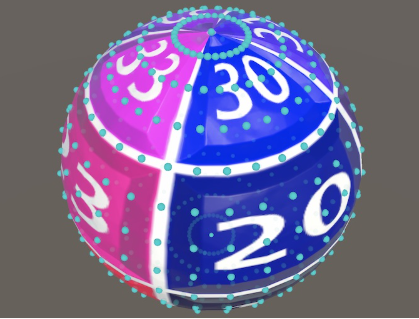
An alternative approach is the cube-sphere, also known as a cube-mapped sphere.
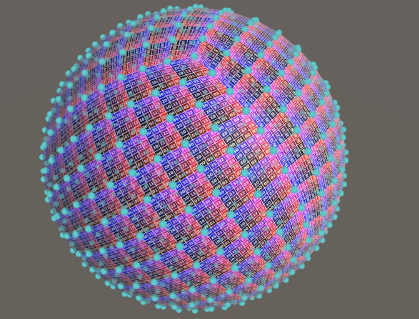
In this method, the sphere is constructed by generating six evenly subdivided faces of a cube and then normalizing the vertices so they lie on a spherical surface. Each face represents a direction (up, down, left, right, front, back), and together they form a complete sphere.
The cube-sphere approach offers several advantages for procedural planet generation:
Triangles are more evenly sized across the entire surface
Noise deformation behaves more consistently on all parts of the planet
Subdivision levels can be adjusted per face, which is useful for future level-of-detail optimizations
The structure naturally aligns with face-based generation logic
Cube-sphere meshes are often preferred for planetary terrain due to their more uniform triangle distribution (Catlike Coding, n.d.). Because uniform terrain deformation was a key requirement for this project, the cube-sphere approach was chosen. Each planet is composed of six individual mesh faces, which are generated independently but share the same shape settings. By normalizing the vertex positions after generating a cube grid, a smooth spherical shape is achieved without the distortion problems associated with UV spheres.
This mesh structure forms the foundation of the planet generator and enables stable application of noise functions and biome calculations in later stages of the system.
2.3 Noise for terrain deformation
To create terrain features such as mountains, valleys, and continents on a procedural planet, the spherical mesh must be deformed in a controlled way. This deformation is typically driven by mathematical noise functions, which generate smoothly varying values across space. By using these values as height offsets, a flat sphere can be transformed into a planet with natural-looking terrain.
Noise functions are widely used in procedural generation because they produce continuous, pseudo-random patterns that resemble structures found in nature. When applied correctly, noise can simulate geological variation without requiring handcrafted data.
2.3.1 Perlin noise and fractal noise
One of the most well-known noise functions used in procedural terrain generation is Perlin noise. Perlin noise produces smooth gradients and is often layered multiple times at different frequencies and amplitudes to create more complex results. This technique is commonly referred to as fractal noise or octave-based noise.
In the early stages of this project, layered 3D Perlin noise was used to deform the planet’s surface. While this approach worked in principle, it quickly revealed several problems when applied to a spherical mesh. Small changes in noise parameters often resulted in extreme height variations, producing sharp spikes and irregular artifacts across the surface. Instead of natural terrain, the generated planets frequently resembled spiky, sea-urchin-like shapes.
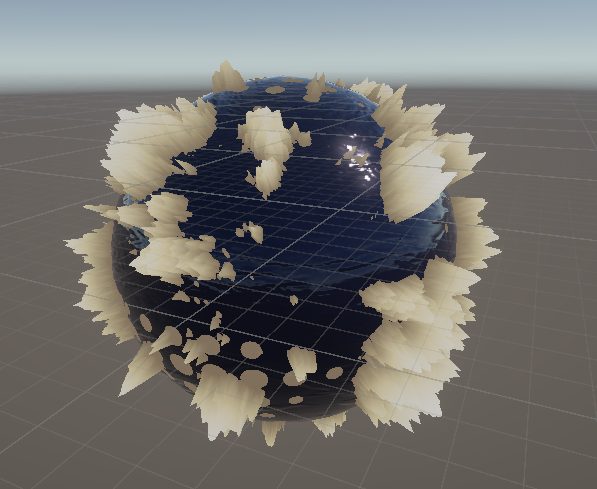
These results highlighted an important limitation: although Perlin noise is effective for planar terrain, it becomes harder to control on curved surfaces, especially when multiple layers are combined without carefully constrained parameter ranges.(Wikipedia contributors, n.d.; Catlike Coding, 2022.).
2.3.2 Switching to simplex noise
To address these issues, further research was conducted into alternative noise functions. This led to the use of simplex noise, which is designed to improve upon classic Perlin noise, particularly in higher dimensions. Simplex noise produces fewer directional artifacts and generally results in smoother and more stable patterns when evaluated in 3D space.
After switching to simplex noise, the terrain deformation became noticeably more controllable. Height transitions were smoother, spikes were reduced, and the overall shape of the planet appeared more coherent. This made it easier to layer multiple noise functions while maintaining predictable results. Simplex noise improves upon classic Perlin noise by reducing directional artifacts, especially in higher dimensions (Catlike Coding, 2021.).
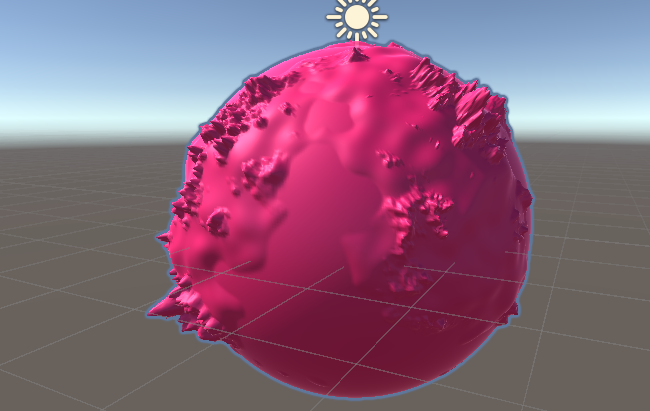
The use of simplex noise also improved the ability to define meaningful parameter ranges. By carefully adjusting strength, roughness, persistence, and layer count, it became possible to generate planets with varied terrain while still preserving a consistent visual identity.
This change marked an important turning point in the project, as it demonstrated that the choice of noise function has a significant impact on both visual quality and development workflow.
2.4 Shading and height-based coloring
While terrain deformation defines the shape of a planet, shading and coloring determine how that shape is perceived visually. Without clear visual feedback, even well-deformed terrain can appear flat or unreadable. For this reason, coloring was treated as an essential part of the planet generation process rather than a purely aesthetic afterthought.
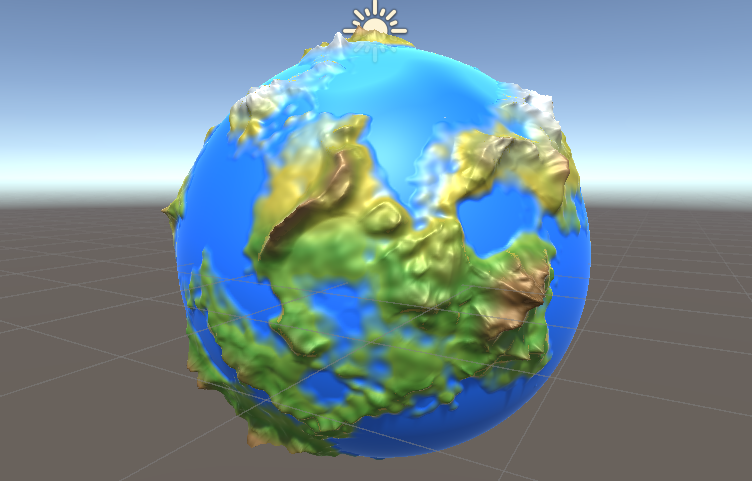
A common approach in terrain rendering is to use height-based coloring, where surface color is determined by the elevation of a vertex relative to the planet’s radius. This technique allows different altitude zones to be visually separated, such as lowlands, higher terrain, and peaks. When applied consistently, height-based coloring can suggest natural phenomena such as oceans, landmasses, snow caps, or rocky regions without the need for manually painted textures.
Instead of relying on static textures, this project uses a parameter-driven coloring system. Colors are defined through gradients and biome rules, which are evaluated dynamically based on the calculated terrain height. This makes the system flexible and allows colors to adapt automatically when the underlying terrain changes.
An important design goal was to ensure that coloring remained readable from a distance. Since planets are often viewed as whole objects rather than close-up surfaces, strong color separation and smooth transitions were prioritized over fine-grained texture detail. This approach aligns well with a stylized visual direction and avoids visual noise.
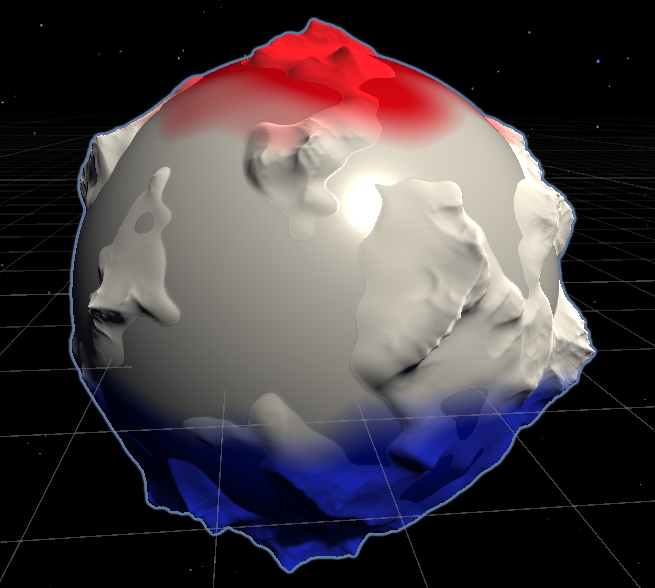
In addition to height-based coloring, biome blending was explored to prevent harsh transitions between regions. By smoothly interpolating between colors over a small height range, the surface appears more cohesive and natural. This technique also allows planets to maintain a consistent identity while still supporting variation through parameter changes.
| Early colored version of Earth like planet | Color distribution |
|---|---|
 |  |
By combining procedural terrain deformation with shader-driven height coloring, the planet generator is able to produce visually distinct planets that remain flexible and easy to iterate on. These concepts form the basis for the implementation discussed in later chapters, where the theoretical ideas presented here are translated into concrete systems and code.
3. System design overview
After exploring the theoretical background behind procedural planet generation, the next step was to design a system that could translate these concepts into a flexible and reusable implementation. The main goal of the system design was to support the generation of multiple independent planets while keeping the architecture modular, readable, and easy to extend.
Rather than building a single hard-coded planet, the system was designed as a planet generator, where each planet instance is driven by its own set of parameters. This allows planets to share the same generation logic while still producing unique results.
To achieve this, the system was divided into several clearly defined components, each responsible for a specific aspect of the generation process.
3.1 Architecture
The procedural planet generator consists of three main layers:
Planet controller Responsible for orchestrating the generation process and managing planet-specific settings.
Geometry generation Handles mesh creation, vertex placement, and terrain deformation.
Color and biome generation Applies height-based coloring and biome blending using shader-driven logic.
Each planet in the scene is represented by a single planet controller object, which coordinates these layers but does not directly handle low-level calculations. This separation of responsibilities improves maintainability and makes the system easier to debug and expand.
3.2 Planet as a self-contained entity
Each planet is designed as a self-contained entity, meaning that all data required for its generation, including radius, noise parameters, and color settings, is stored independently per planet. By avoiding shared mutable data between planets, the system prevents unintended side effects where changes to one planet influence another.
This design decision became especially important when supporting multiple planets in the same scene. Early versions of the system reused shared settings, which caused planets to mirror each other’s appearance. By restructuring the system to allow unique settings per planet, each instance could be generated, modified, and randomized independently.
This approach also supports future extensions, such as saving planet presets or generating planet types that follow specific constraints.
3.3 Separation of shape and color logic
To keep the system modular, terrain deformation and visual appearance were handled by separate subsystems. The shape of the planet is generated independently from its color, allowing terrain and visuals to evolve without tightly coupling their logic.
Shape generation focuses on:
Cube-sphere mesh construction
Vertex displacement using layered noise
Tracking elevation ranges for later use
Color generation focuses on:
Height-based gradients
Biome blending
Shader parameter updates
By separating these concerns, changes to terrain generation do not require changes to color logic, and vice versa. This also made it easier to experiment with different visual styles while keeping the underlying terrain system intact.
3.4 Data-driven design using settings assets
A key design choice was to make the system data-driven rather than hard-coded. Planet properties are defined through reusable settings assets, which can be assigned per planet. This allows developers to create planet presets without modifying code and makes iteration significantly faster.
Using settings assets also enables:
Easy duplication of planet types
Controlled randomization within defined bounds
Non-destructive experimentation with parameters
This approach bridges the gap between technical systems and creative control, allowing both structured generation and artistic freedom.
4. Implementation details
This chapter describes how the procedural planet generator was implemented in Unity. The implementation is divided into the main technical components of the system: mesh generation, terrain deformation using layered noise, and biome-based coloring. Code snippets are included to illustrate key parts of the implementation and to connect the system design from Chapter 3 to the final working generator.
4.1 Cube-sphere mesh generation using six faces
To generate a spherical planet mesh with uniform triangle distribution, the system uses a cube-sphere approach. The planet is constructed from six mesh faces, each corresponding to a direction vector (up, down, left, right, forward, back). Each face generates a grid of vertices on a cube, after which the vertices are normalized to form a sphere.
In this project, the Planet component is responsible for creating and managing these six faces. During initialization, it ensures the planet has six MeshFilter children and assigns a mesh to each one. Each face is then represented by a TerrainFace instance, which constructs the actual vertex and triangle data.
The directions used for the cube faces are defined as:
Vector3[] directions = {
    Vector3.up, Vector3.down, Vector3.left, Vector3.right, Vector3.forward, Vector3.back
};
Each face builds its mesh as a 2D grid with a configurable resolution. The grid coordinates are converted into a point on the cube face using two perpendicular axes (axisA and axisB). This point is then normalized into a point on the unit sphere.
The following snippet from TerrainFace.ConstructMesh() shows the core cube-to-sphere step:
Vector2 percent = new Vector2(x, y) / (resolution - 1);

Vector3 pointOnUnitCube =
    localUp
    + (percent.x - .5f) * 2 * axisA
    + (percent.y - .5f) * 2 * axisB;

Vector3 pointOnUnitSphere = pointOnUnitCube.normalized;
After the spherical position is determined, the vertex is displaced outward based on the terrain elevation (explained in the next section). The mesh triangles are generated in a consistent winding order so normals are calculated correctly:
if (x != resolution - 1 && y != resolution - 1)
{
    triangles[triIndex] = i;
    triangles[triIndex + 1] = i + resolution + 1;
    triangles[triIndex + 2] = i + resolution;

    triangles[triIndex + 3] = i;
    triangles[triIndex + 4] = i + 1;
    triangles[triIndex + 5] = i + resolution + 1;
    triIndex += 6;
}
Finally, the mesh is applied and normals are recalculated:
mesh.Clear();
mesh.vertices = vertices;
mesh.triangles = triangles;
mesh.RecalculateNormals();
mesh.uv = uv;
This cube-sphere approach provided a stable foundation for terrain deformation. Because triangle sizes remain relatively uniform across the planet, noise-based displacement behaves more consistently than it would on a UV sphere, especially near the poles.
4.2 Terrain deformation using layered noise
After constructing a cube-sphere, the next step is to deform the surface into terrain. This project performs terrain deformation by evaluating one or more noise layers at each point on the unit sphere and using the combined result as elevation.
The terrain system is data-driven through ShapeSettings, which defines:
the planet radius
a list of noise layers
per-layer settings such as strength, roughness, persistence, and masking
A noise layer is represented as:
[System.Serializable]
public class NoiseLayer
{
    public bool enabled = true;
    public bool useFirstLayerMask;
    public NoiseSettings noiseSettings;
}
4.2.1 Noise filters and filter selection
To support multiple terrain styles, the system uses a noise filter interface:
public interface INoiseFilter
{
    float Evaluate(Vector3 point);
}
Each noise layer chooses a filter type using NoiseSettings.FilterType:
public enum FilterType { Simple, Rigid };
public FilterType filterType;

public SimpleNoiseSettings simpleNoiseSettings;
public RidgidNoiseSettings ridgidNoiseSettings;
A factory pattern is used to create the correct filter implementation based on this type:
public static INoiseFilter CreateNoiseFilter(NoiseSettings settings)
{
    switch(settings.filterType)
    {
        case NoiseSettings.FilterType.Simple:
            return new SimpleNoiseFilter(settings.simpleNoiseSettings);
        case NoiseSettings.FilterType.Rigid:
            return new RidgidNoiseFilter(settings.ridgidNoiseSettings);
    }
    return null;
}
This design keeps the ShapeGenerator independent from specific noise implementations and makes it easy to add new filter types later.
4.2.2 Layered elevation and masking
The ShapeGenerator combines noise layers to calculate an unscaled elevation value per vertex. The first layer is treated specially because it can act as a mask for additional layers (useful for continent-like shapes).
This is implemented in ShapeGenerator.CalculateUnscaledElevation():
float firstLayerValue = 0;
float elevation = 0;

if (noiseFilters.Length > 0)
{
    firstLayerValue = noiseFilters[0].Evaluate(PointOnUnitSphere);
    if (settings.noiseLayers[0].enabled)
    {
        elevation = firstLayerValue;
    }
}

for (int i = 1; i < noiseFilters.Length; i++)
{
    if (settings.noiseLayers[i].enabled)
    {
        float mask = (settings.noiseLayers[i].useFirstLayerMask) ? firstLayerValue : 1;
        elevation += noiseFilters[i].Evaluate(PointOnUnitSphere) * mask;
    }
}
Masking allows higher-frequency detail (mountains, roughness) to only appear in areas defined by the base shape (continents), rather than affecting the entire planet uniformly.
To support later coloring and shading, the system also tracks the minimum and maximum elevation values using a MinMax helper:
elevationMinMax.AddValue(elevation);
return elevation;
4.2.3 Scaling elevation by planet radius
The unscaled elevation is converted into a final vertex radius by multiplying it with the planet radius. Negative elevations are clamped to avoid inverting the surface.
public float GetScaledElevation(float unscaledElevation)
{
    float elevation = Mathf.Max(0, unscaledElevation);
    elevation = settings.planetRadius * (1 + elevation);
    return elevation;
}
This keeps the base sphere size consistent while allowing terrain height variation as a percentage of the radius.
4.2.4 Simple noise filter
The simple noise filter evaluates noise across multiple layers (octaves). Each layer increases frequency and reduces amplitude using roughness and persistence.
float noiseValue = 0;
float frequency = settings.baseRoughness;
float amplitude = 1;

for (int i = 0; i < settings.numLayers; i++)
{
    float v = noise.Evaluate(point * frequency + settings.centre);
    noiseValue += (v + 1) * .5f * amplitude;
    frequency *= settings.roughness;
    amplitude *= settings.persistence;
}

noiseValue = noiseValue - settings.minValue;
return noiseValue * settings.strength;
4.2.5 Rigid noise filter
The rigid noise filter creates sharper ridges and mountain-like structures by inverting and squaring the noise signal, then applying a weight multiplier to emphasize peaks.
float noiseValue = 0;
float frequency = settings.baseRoughness;
float amplitude = 1;
float weight = 1;

for (int i = 0; i < settings.numLayers; i++)
{
    float v = 1 - Mathf.Abs(noise.Evaluate(point * frequency + settings.centre));
    v *= v;
    v *= weight;
    weight = Mathf.Clamp01(v * settings.weightMultiplier);

    noiseValue += v * amplitude;
    frequency *= settings.roughness;
    amplitude *= settings.persistence;
}

noiseValue = noiseValue - settings.minValue;
return noiseValue * settings.strength;
This filter is useful for adding mountain ridges and sharper terrain detail without simply increasing noise strength globally.
4.3 Coloring, biomes, and shader-driven gradients
Once the planet geometry has been generated and deformed, the final step is to assign visual identity through color. In this project, coloring is handled procedurally using a combination of biome logic and shader-driven gradients. This allows the appearance of the planet to adapt automatically to changes in terrain without relying on static textures.
4.3.1 Elevation-aware coloring
To ensure that color transitions align with the underlying terrain, the system tracks the minimum and maximum elevation values generated during mesh construction. These values are passed to the planet material so that the shader can correctly map height ranges to colors.
At the end of mesh generation, the elevation range is updated:
colourGenerator.UpdateElevation(shapeGenerator.elevationMinMax);
This allows the shader to interpret height consistently across different planets, even when their terrain parameters vary significantly.
4.3.2 Biome-based color selection
Instead of using a single gradient for the entire planet, the system supports multiple biomes. Each biome is defined by:
a height threshold
a color gradient
optional tinting values
For each vertex, a biome index is calculated based on its normalized height and latitude. This index is then used as a lookup value in the shader.
Conceptually, the biome selection works as follows:
The vertex height is normalized to a 0–1 range
A small amount of noise is applied to break up uniform transitions
Biome weights are blended to avoid hard edges
This approach enables smooth transitions between regions such as oceans, landmasses, and higher terrain while maintaining visual coherence.
4.3.3 Biome lookup using UV coordinates
To pass biome information efficiently to the shader, the biome index is encoded in the mesh’s UV coordinates. Each vertex stores its biome position in the horizontal UV channel, while elevation data is stored vertically.
This mapping allows the shader to sample a generated texture containing all biome gradients and colors. Because the texture is generated procedurally, changing biome parameters immediately updates the visual output without modifying the shader logic.
uv[i].x = colourGenerator.BiomePercentFromPoint(pointOnUnitSphere);
This single value acts as a compact representation of biome information and keeps the rendering pipeline lightweight.
4.3.4 Advantages of the approach
By separating terrain generation from visual interpretation, the coloring system remains flexible and scalable. New biomes can be added without modifying mesh generation, and visual styles can be changed by adjusting gradients rather than rewriting code.
This design also supports future extensions, such as animated materials, atmosphere effects, or time-based color changes, without impacting the core generation logic.
4.4 Generating multiple independent planets
An important requirement of the project was the ability to generate multiple planets within the same scene without unintended interaction between them. Each planet needed to be fully independent so that changes made to one would not affect others.
Early versions of the system reused shared settings, which caused planets to mirror each other when parameters were modified. This behavior demonstrated the risks of shared mutable data in procedural systems.
To resolve this, the system was adjusted so that each planet operates on its own set of shape and color settings. This ensures that planets can be regenerated, edited, and randomized independently.
With this isolation in place, controlled randomization could be applied safely. Parameters are randomized within predefined bounds, allowing visual variation while preserving recognizable planet types. This approach supports scalability and experimentation without sacrificing consistency.
5. Challenges, failures, and lessons learned
Throughout the development of the procedural planet generator, several challenges were encountered that significantly influenced both the technical direction of the project and the learning outcomes. Many of these challenges only became apparent through experimentation and iteration rather than during the initial planning phase.
Noise and terrain deformation
As seen earlier one of the earliest challenges was achieving terrain deformation that appeared natural. Initial attempts relied on layered 3D Perlin noise, which frequently resulted in extreme spikes and irregular artifacts. Instead of smooth landscapes, the generated planets often resembled spiky, sea-urchin-like shapes.
This issue highlighted the importance of selecting an appropriate noise function and carefully tuning its parameters. Switching to simplex noise significantly improved stability and control, resulting in smoother terrain and more predictable outcomes.
Controlling randomness
Another challenge involved managing randomness in a meaningful way. While procedural generation benefits from variation, fully unconstrained randomization quickly led to chaotic results that lacked visual coherence.
This was resolved by introducing controlled parameter ranges and limiting which values could be randomized. As a result, planets could vary in appearance while still maintaining a recognizable identity and consistent style.
Shared data and planet independence
A major system-level challenge occurred when multiple planets were introduced into the same scene. Early implementations reused shared settings, which caused planets to mirror each other when parameters were modified.
This problem emphasized the risks of shared mutable data in procedural systems. By ensuring that each planet operates on its own configuration data, planets could be generated and edited independently without unintended side effects.
Project structure and workflow
In the early stages of development, the project progressed without a strict step-by-step plan. This sometimes led to unnecessary trial-and-error and made it easier to get sidetracked by individual technical problems.
Over time, it became clear that breaking the project into smaller, clearly defined steps would have improved efficiency and focus. This insight will strongly influence how similar projects are approached in the future.
6. Results and final outcome
This chapter presents the final outcome of the procedural planet generator and evaluates whether the original goals of the project were achieved. By the end of development, the system evolved from generating a single planet into a flexible generator capable of producing multiple visually distinct planets within the same scene.
The final generator allows each planet to be customized through shape and color parameters, supports controlled randomization, and ensures that planets remain independent from one another. This makes the system suitable for experimentation, iteration, and potential reuse in future projects.
6.1 Visual results
The most visible result of the project is the ability to generate planets with clearly different silhouettes, terrain features, and color palettes. Differences in noise configuration, radius, and biome settings result in planets that feel distinct while still sharing a coherent visual style.
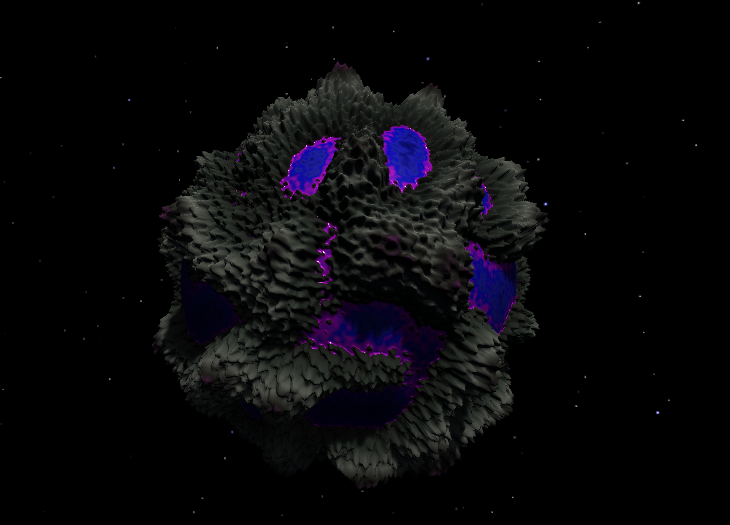
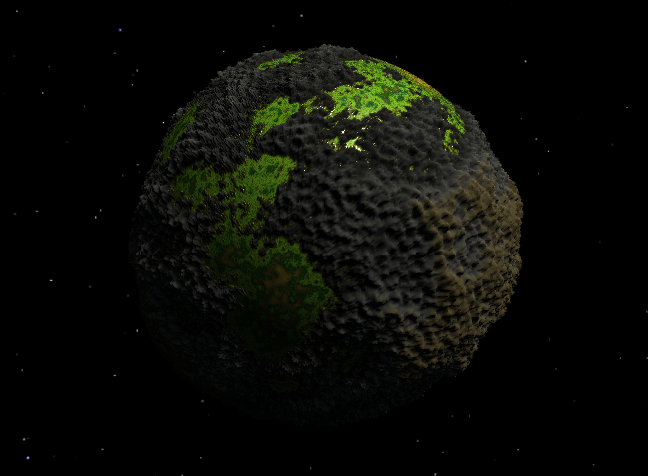
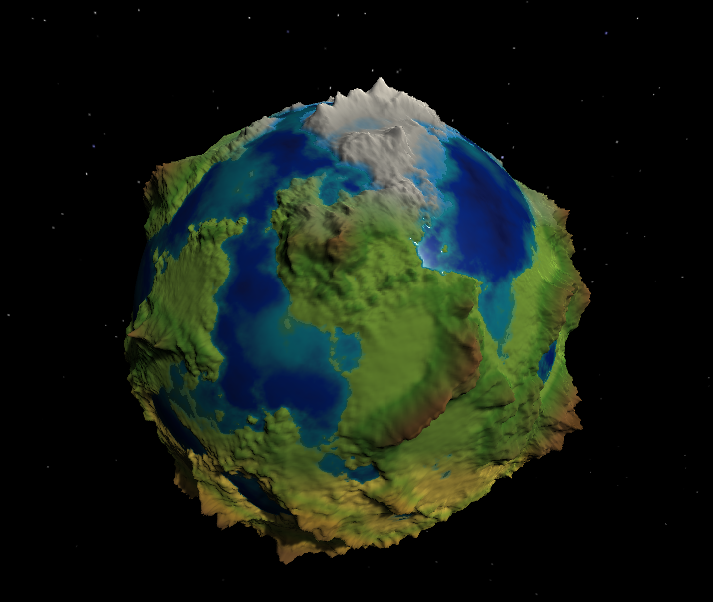
These results demonstrate that the cube-sphere approach combined with layered noise and biome-based coloring provides enough flexibility to generate a wide range of planet appearances without manual modeling.
6.2 Generator flexibility
Beyond visual quality, the system succeeds as a generator rather than a single hard-coded asset. Planets can be duplicated, regenerated, and randomized independently, allowing multiple variations to exist side by side. Changes to one planet do not affect others, which was a key requirement during development.
Controlled randomization ensures that generated planets remain within expected bounds, preserving a recognizable planet type while still allowing variation. This balance between control and randomness proved essential for maintaining visual consistency.
6.3 Performance and usability
The generator is designed primarily as an editor-driven tool, enabling rapid iteration without requiring runtime execution. This approach keeps performance overhead low during gameplay or simulation, as planets are generated ahead of time rather than continuously at runtime.
From a usability perspective, separating shape and color settings made experimentation more intuitive. Adjustments to terrain or visuals can be made independently, reducing the risk of unintended side effects and speeding up iteration.
6.4 Project goals evaluation
The original goal of the project was to explore procedural planet generation and transform it into a reusable generator capable of producing multiple planets. This goal was achieved by:
Implementing a stable cube-sphere mesh foundation
Applying layered noise for terrain deformation
Using height-based biome coloring for visual clarity
Supporting independent planets with controlled randomization
Overall, the final outcome demonstrates a successful combination of technical research, experimentation, and practical implementation.
7. Conclusion
This research set out to explore how a procedural planet generation system could be designed to create visually diverse and scalable planets using parameter-driven techniques. Through the use of a cube-sphere mesh, layered noise-based terrain deformation, and height-based biome coloring, a flexible planet generator was successfully implemented in Unity.
The project demonstrated that procedural planet generation benefits greatly from structured system design and controlled randomness. By separating shape generation from visual interpretation and isolating configuration data per planet, the system was able to generate multiple independent planets without unintended interactions. This approach ensured both technical stability and creative control.
Furthermore, the research highlighted the importance of choosing appropriate noise functions for spherical terrain deformation. Early challenges with Perlin noise led to the adoption of simplex noise, which provided smoother results and improved parameter control. Combined with shader-driven coloring, this allowed the generator to produce readable and visually distinct planets.
Overall, the project achieved its goal of transforming procedural planet generation from a single experimental setup into a reusable generator. The resulting system forms a solid foundation for further exploration of procedural environments and large-scale world generation.
8. Reflection and future work
This project provided valuable insight into both procedural content generation and system design. What initially appeared to be a straightforward task quickly revealed itself as a complex balance between mathematical control, visual clarity, and architectural decisions. Through experimentation and iteration, the project evolved from a single procedural planet into a flexible and reusable generation system.
Working on this project improved understanding of noise functions, shader-driven visuals, and the importance of isolating data in procedural systems. It also highlighted the value of structured planning when tackling technically open-ended problems.
8.1 Future improvements
Although the generator meets its original goals, several improvements could be explored in future work. These include:
adding atmosphere and cloud layers to enhance realism
supporting runtime generation and level-of-detail systems for large-scale scenes
expanding biome logic with temperature and latitude-based rules
improving performance for very high-resolution planets
Overall, the project forms a solid foundation for further experimentation with procedural environments and large-scale world generation.
Sources
[1] Catlike Coding. “Going from Cube to Sphere”. Cube sphere. 2022. [Online]. Available: https://catlikecoding.com/unity/tutorials/cube-sphere/
[2] Catlike Coding. “Gradient Noise”. Perlin noise. 2021. [Online]. Available: https://catlikecoding.com/unity/tutorials/pseudorandom-noise/perlin-noise/
[3] Catlike Coding. “Simplexes and Radial Kernels”. Simplex noise. 2021. [Online]. Available: https://catlikecoding.com/unity/tutorials/pseudorandom-noise/simplex-noise/
[4] Cyanilux. “Depth”. Depth-based effects in shaders. 2020. [Online]. Available: https://www.cyanilux.com/tutorials/depth/#sample-depth-texture
[5] J. SmashRiot. “Procedural Planets”. Procedural planets. 2018. [Online]. Available: https://smashriot.com/procedural-planets/
[6] Wikipedia contributors. “Perlin Noise”. Perlin noise. Wikipedia. [Online]. Available: https://en.wikipedia.org/wiki/Perlin_noise
[7] Wikipedia contributors. “Pink Noise”. Pink noise. Wikipedia. [Online]. Available: https://en.wikipedia.org/wiki/Pink_noise